On a default Windows installation, every time you try to install or run a program (or do just about anything), it prompts you to ask if you really want to do this. Here’s how to turn that off.
On a default Windows Vista, Windows 7 or Windows 8 installation, every time you try to install or run a program (or do just about anything), it prompts you to ask if you really want to do this. I love Windows’s new look and feel, but this “feature” drove me absolutely nuts until I figured out how to disable it. Fortunately, turning it off is pretty easy to do by following the steps below:
- Click the Windows Start icon and select Control Panel.
- Click “User Accounts and Family Safety”, and then click “User Accounts”.
- Click “Turn User Account Control on or off”. Windows will prompt you to ask for your permission to continue (see what I mean about annoying??).
- Uncheck the “Use User Account Control” checkbox and press Ok to save your change.
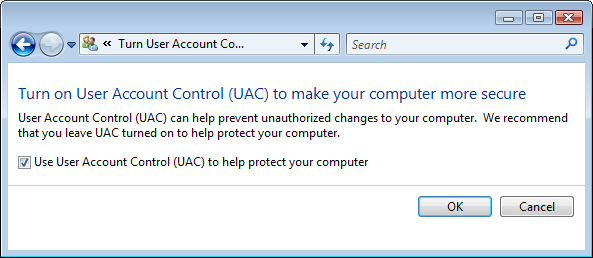 After making this change, you’ll be prompted to restart your computer, which you’ll need to do before the change becomes active. When you restart, you’ll be able to run programs and install new programs without getting the annoying confirmation prompts. It’s amazing how this one little setting can greatly improve your Windows experience!
What if I want UAC?
OK fine, but if I really want the UAC for everything else, how do I turn it off for just one program?
Thank you
Before reading your post, I thought that Microsoft has one Nuts. It doesn’t want profesional people to use Vista or any of his software as it is turning each of these programs for dumbe ones. be it office 2007 or vista. All feature are so much icon driven and so much interaction is required one get dousy before starting to work.
Thanks for revising my intrest in Vista
jan gan
Holy crap… THANK YOU SO
THANK YOU SO MUCH FOR THIS PAGE!!!!!
Every time I tried to do anything, and I mean anything that stupid window pops up. Move a file…POP!!…Paste a file…POP!!! Install a file..POP!!..Change settings…POP!!
All I wanted to do was install files in my C: directory, but NOOOO, Vista needed me to click three different security screens to do this. For heaven’s sake, stop calling it more secure and call it what it is: annoying, monotonous, time consuming and just plain wasteful. Thanks for your help!
Ok, so I never had this
Ok, so I never had this problems before I brought my laptop to this computer repair place (just to transfer all the documents to a new laptop-nothing is wrong with it). Now, I can’t open, save or create anything in the user. It’s asking permission all the time, so I followed the steps to get rid off it. and it shows on my security panel that the User account thing is off. and I still can’t open,save or create anything. Can someone help me? I’m afraid to bring my laptop back to that place, cause they probably caused it to begin with.
It’s already unchecked, yet
It’s already unchecked, yet it still does it all the bloody time. Any other suggestions?