If you have a specific folder that you’d like Windows Explorer to always open to by default, then here’s an easy way to make that happen.
Ever notice how Windows Explorer opens up to your Documents folder on Windows Vista, or the My Documents folder on XP?
That’s not usually where I want to start looking for files – I usually want Windows Explorer to open at the root of my C: drive.
If you have a specific folder that you’d like Windows Explorer to always open to by default, then here’s an easy way to make that happen.
First, find the menu or shortcut that you typically use for opening Windows Explorer. For most people that’s going to be on the Start — All Programs — Accessories — Windows Explorer menu.
To make it easier to get to, you can copy that menu to your Windows taskbar by right-clicking the Windows explorer menu, selecting Copy, and then right-clicking on the taskbar next to the Start button and selecting Paste.
Once you find the Windows Explorer menu or shortcut, right-click it and select Properties
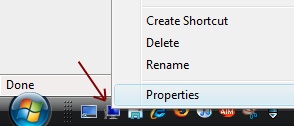
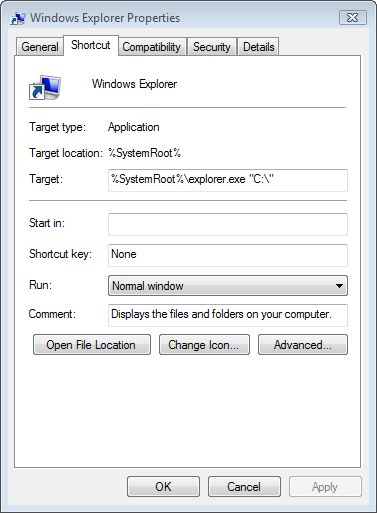
You’ll be prompted with a Windows Explorer Properties dialog. In the Target field, enter the desired startup folder in double-quotes after explorer.exe. Be sure to leave a space between the folder location and explorer.exe, like this:
For Vista:
%SystemRoot%\explorer.exe “C:\”
For XP:
%SystemRoot%\explorer.exe /e,”C:\”
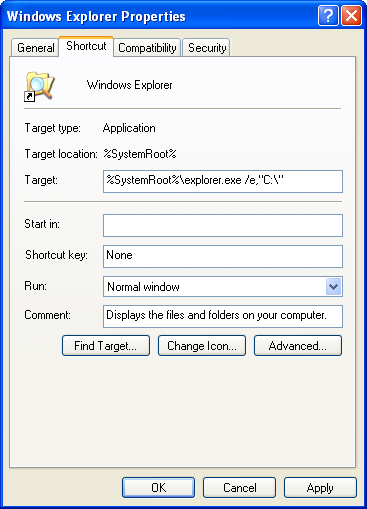
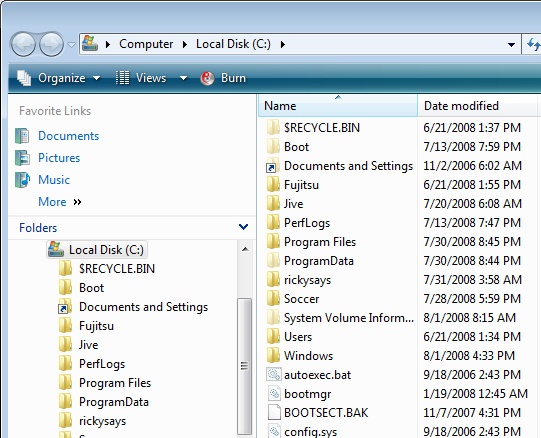
Click OK, and the next time you select that menu or shortcut, Windows will open Explorer in that folder by default.
“Start in:”
Thanks for the tip Ricky. Worked like a charm. I’ve always wondered why Microsoft have the “Start In:” option, in their Explorer properties box, yet it hasn’t really worked since Windows 98. Since it obviously isn’t for what it implies, do you know what it IS for ?