Question: My iPod has totally stopped working. It won’t charge when plugged into the computer and won’t turn on at all. What can I do?
Question: My iPod has totally stopped working. It won’t charge when plugged into the computer and won’t turn on at all. Could it be a battery issue? Thanks – Jean
Answer: Jean, you’re not alone with the whole iPod freezing situation. I just bought my wife an iPod nano for Valentine’s Day, and two days later it completely froze up. The kids had been playing with it, and I think they just got a little crazy with all the buttons.
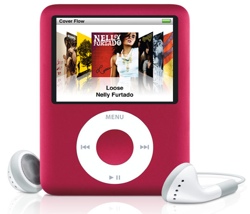
Resetting a Frozen iPod, iPhone, or iPad
The trick for resetting a frozen iPod or iPhone (yes, this works on iPads too) is to press the Menu and center button at the same time and hold them for about 6 seconds.
You should see the Apple icon and your iPod should restart. Give that a try and let me know if it does the trick.

Haha.. Works like a champ
Haha.. Works like a champ now!! Read the other Thanx.. Seems like you saved a million Ipods… Thanks much
Thank you so much! I thought
Thank you so much! I thought my iPod had died on me, but all I had to do is reset! Thank youu!
Frozen ipod
Thank you so much Ricky, that tip about pressing Menu and the centre button worked straightaway, that is so good to know, thought my ipod had died forever. I am going to pass it around everyone I know. Good on ya from downunder
I-Pod Touch
The start of my I-Pod brings my life again…It had stopped working completely but after I read ur comments I was able to get my I-Pod back to working condition…U r a genius!! Thanks a ton for sharing this!!!
thank you! my ipod just went
thank you! my ipod just went blank yesterday and i was about to take it to apple then googled it. Awesome. Hooray.
My Ipod has previously
My Ipod has previously uploaded a Virus but i had it took back to the shop for them to clear it twice but still doesn’t work. It always says on Itunes i need to restore but when i do it does nothing. It claims its in recovery mode. It won’t let me upload anything or do anything to it.. Help
Thank you VERY much, I never
Thank you VERY much, I never heard about the trick, but it worked alright!
I-pod frozen
Thanks for the tips to reset, it worked immediately.
Reading these comments about
Reading these comments about your advice working really made me believe that my beautiful Ipod WILL work again. Unfortunetly, it didn’t helped me at all. I hold the Menu and Center button and nothing comes out. I tried charging it, i didn’t use it for a day hoping that somehow it’ll start working again. Haha. I think my Ipod is gone forever this time. 6 years with him! 6 years!!!!!!!!!
Ipod
Thanks a LOT the reset trick worked I had NO idea what to do before then I’m sure I’ll need your help again so once again BIG thanks.
A big thanks Rick hubby
A big thanks Rick hubby happy once again holdin down menu and centre button restarted his ipod
ipod quit working!
Thank you so much for the tip on how to reset my ipod! I was just sick until I googled and found your website. I can’t believe I couldn’t find anything in the user guide on this!
THANK YOU
…just found this through a google search. my son is also very grateful. we both are, because i was going to go buy him a new unit tomorrow.
thank you again.
freezing
i had the problem of my ipod freezing and just being blank. i tried holding the menu button and the middle button at the same time and now it works. but why does this happen?
iPod freezing
Hi. Same thing happened to me when I was out on my bike at the weekend. Thought iPod had given up the ghost till I Googled my problem and your page came up. Took your advice and it did the trick. Thanks a lot!!
THANKS
This is 2012 and your ‘menu and middle button’ advice literarily bailed me out tonight. I wish you all the best wherever you are today.
Just saved me from having a
Just saved me from having a mental breakdown I thought my iPod was broken for good, the reset trick really helped me thanks so much
RICK YOU ARE A GENIUS!! I
RICK YOU ARE A GENIUS!! I was so upset when I thought my ITouch was broken but thanks to you I got it working again 🙂 You don’t know how much it means to me so thank you.
Thank yo so much man…you
Thank yo so much man…you are a genious!
I thought my iPod was toast
I thought my iPod was toast but I re-set the device as per your instructions and now it works perfectly. Thanks!
in the front of the ipod it
in the front of the ipod it is showing the sub cable and the itunes icon and it is frozen on that screen and its says you need to connect it to itunes.
Fixed in the UK!!!
MIne stopped working last night after a gym session and just logged on today to see if it was fried. Tried your little trick and after about 15 seconds it came on!! You are a genius.
Peter
Thanks Ricky, it worked just
Thanks Ricky, it worked just as you said it would. I was about to take it in to a shop here in Chinatown you just save some money. Thanks again.
IPod works again!!
My daughter gave me my Ipod a few years ago and didn’t know if I would use it. I love it and went to use it the other day and it worked fine–drove a ways and took it out when I reached my destination and it wouldn’t work–was heartbroken and thought it was done. Found this site–tried it and it once again works—the first song that came up was thunderstruck by AC/DC I sure was thunderstruck that my IPod came back to life–I am 56 and hate cell phones but love computers to research help like this–thanks so much for all the help!!
ipod frozen
THANKYOU!!!! My ipod has been down for months and I’d given it up for dead then today thought I would give it one last shot before I binned it. Had to try the button pressing for a while but was delighted when it finally worked!!
Ipod was not working
Thanks a lot. I tried the trick you posted to press menu and center botton for 6 seconds. Apple icone appeared and ipod started working. Thanks again.
Thank you very much! My sons
Thank you very much! My sons ipod just froze , and you enabled me (mum) to perform technical wizardry that stunned him and put the smile back on his face!
Thank you sooooooooooo much
Thank you sooooooooooo much for making this site Ricky, you saved may life, Im very thankful. Awesome tip it really works !! YOU ROCK !!!!!!!!
My sons ipod touch has done
My sons ipod touch has done same thing. he has informed me that his menu button doesnt work right so what can i do to reset his without the second button to push
thank you so much. I freaked
thank you so much. I freaked out on my daughter because I thought she was lying to me when she said it just stopped working. I figured she dropped it or something.
Thank you so much for this
Thank you so much for this info, I thought my ipod had died this morning. Have liked and shared on Facebook. Chuffed to bits!
Thx!! I thought my I pod was
Thx!! I thought my I pod was totally messed up but now it works!!
Thank you so much!! I thought
Thank you so much!! I thought my iPod was a definite goner. This saved the day. 🙂
I hadn’t used my iPod in a
I hadn’t used my iPod in a while. Yesterday I used it and all was fine. This morning all was fine. Now it won’t work. It’s fully charged. I tried your trick and the Apple logo did come up. It even went to the screen with Music, Genius, Albums, Videos, etc. It’s even shuffling album covers on the bottom of the screen. It just won’t work! I press Play, nothing, no sound or anything! Please help
My little ‘ipod’ has now been
My little ‘ipod’ has now been resurrected.
You are a wizard and my hero!!!
What happened? Will this happen again?
Thank You So, So much!
amazing… I too thought my
amazing… I too thought my 3rd generation Nano was done but I found this post! Thank you sooo much
Thanks!!!!!!!!!!!!!!!!!! you
Thanks!!!!!!!!!!!!!!!!!! you saved my ipod!
Resetting worked for me.
Resetting worked for me. However, apparently nothing was done that could have triggered the switch off… Apple and it’s mysterious bugs…
Thanks for the trick anyway
Thank you. Like others have
Thank you. Like others have said, I thought I’d have to buy a new I pod. Not looking forward to that expense. I’m a happy camper again.
Thank you so much! I went to
Thank you so much! I went to a MAC/Apple specialist repair shop today and they had no idea how to fix it!!! Took two attempts, but it started back up and is working perfectly again! Wonderful!!!
Ricky – you are the best! My
Ricky – you are the best! My ipod suddenly stopped. I couldn’t turn it on. Charged it for days -still nothing. Started to google and found your answer. Held for 10 seconds and it’s back on. Thanks for saving my workouts from being silent and boring!!
The advice for unfreezing my
The advice for unfreezing my iPod was brilliant! Think the little grandsons had been pressing buttons randomly in quick succession; this solution worked instantly with all files left intact. Thank you!