The iPhone 3G will be my new travel companion when I leave for Zurich, Switzerland tomorrow morning (yep, I finally upgraded from my Blackberry Curve).
The iPhone has a lot to offer the international traveler, and here are 10 ways you can use the iPhone to help you on your next trip abroad (most are applicable even if you’re just traveling to another state or province).
Note: if you’re looking for ways to save money on data roaming charges, scroll down to the bottom of this page.
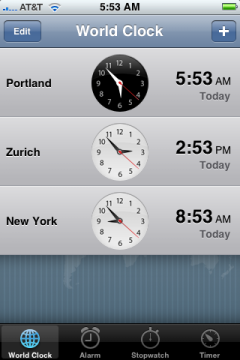
- Mind the Time with a World Clock:
Keeping track of the current time is the first thing I worry about when I travel across multiple time zones, and the iPhone lets you add a clock for every imaginable city in the world. I’ve added a clock for my destination city, my lay-over city, and my home city.
- Pack for the Right Weather:
You can add Yahoo! weather reports for any city, just by opening the Weather app and clicking the little “i” at the bottom right of the weather screen. You can store multiple weather reports and easily flip through them to see what the weather is like in other areas of the world.

Looks like it’s cold in Zurich in October, so I’ll be sure to pack warm clothes for my trip.
- Manage your Monday with Currency Convertors:
Convertor Pro is a freebie that you can download from the App Store that lets you convert any currency to another. It’s updated every hour with actual current rates too.
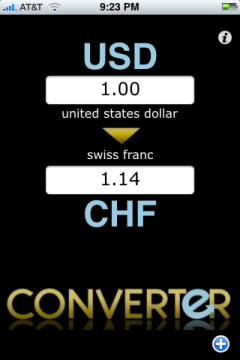
You can also click the “i” in the upper right of the screen to view a graph of the currency conversion rate over the last 5 years – handy for evaluating global economic trends.
- Learn the Lingo with Language Packs:
I visited Germany for the summer back in 1989 (dating myself a bit here) and picked up a little Germany while I was there, but I’m pretty rusty.
You can download free Cool Gorilla language packs from the App Store for quite a few different languages, including German which is the official language in Switzerland.
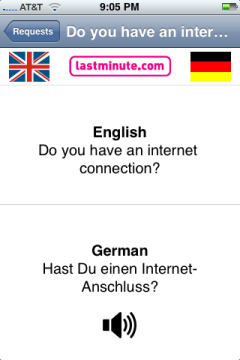
The language lessons let you read and hear the words or phrases with the correct pronunciation. I’ll be listening to this on the plane over, and was surprised at how much I had remembered from my previous trip almost 20 years ago.
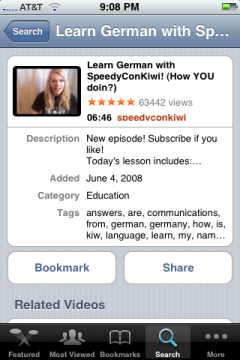
- Learn a Language from YouTube:
You can find quite a few language instructional videos for free on YouTube, that make it almost like sitting in a virtual classroom.
- Speak the Right Way with Language Translators:
These aren’t free, but are pretty close at only $3.99 for the iTranslate programs that bring text-to-speech capability to the iPhone. Not only do they translate English sentences into foreign languages, but it reads them back to you in that language!
Just do a search for iTranslate and you’ll see a list of programs for each major language.
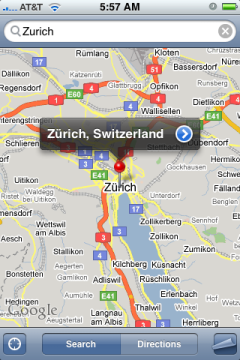
- Plan your Trip with Google Maps: Google maps are built into the iPhone. Once you’ve located your destination city, you can search for nearby restaurants, hotels, or tourist events.
- Find Yourself with GPS:
It’s really easy to get lost in a different city, let alone a foregin country. I found that to be the case while visiting London, and I’ve already printed out several Google maps so I’ll know how to get to my hotel from the airport.

While you’re viewing a Google map, tap the locator icon in the bottom left of the screen and the map will zoom in on your current position. It uses a combination of GPS satellite positioning and cell phone triangulation to narrow in on your location, and I’ve found it to be noticeably more accurate than the Blackberry’s GPS.
- Make the right Calls with International Assist:
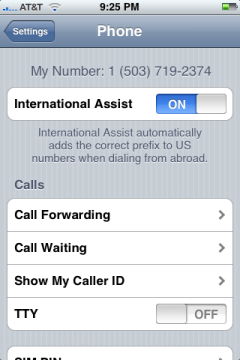
Apple was smart enough to include international dialing assistanc, where it will add the correct prefic to US numbers when dialing from abroad.
To turn on this feature, tap “Settings” and then “Phone”, and turn on “International Assist”.
- Wake up on Time with Alarms:
Last but not least – no matter how jet-lagged you might be after that first night’s sleep, you can rely on the iPhone’s built-in alarms to wake you up.
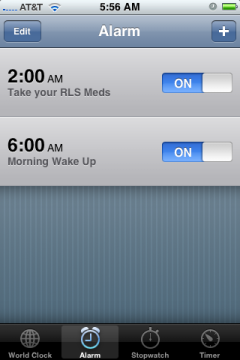
You can even set multiple alarms, which is helpful if you have a medicine that you need to take on a regular basis. I have severe Restless Legs Syndrome that requires me to take medication every night before bed and also at 2:00 a.m. in the morning, so this feature will be a big help.
This list covers what your iPhone can do for you while you’re traveling abroad or even just traveling to another state – but there’s one more thing you’ll need to do:
Sign up for an international data plan.
If you go overseas without doing this, you’ll wind up with an astronomical bill for doing regular things like checking email, sending your wife a few instant messages or text messages, checking the web for your checking account balance, etc (HUGE, as in thousands of dollars, according to the AT&T rep I spoke with just a few minutes ago).
By astronomical, I mean upwards of $2500 or more depending on how long you’re traveling.
There are 2 types of coverage/service that you’ll need: phone coverage and data service. You can get an international roaming plan for your phone calls that varies in price depending on which country you’re visiting – check here for details. Switzerland is $5.99 and that brings calls down to 99 cents a minute.
LOL, yep, you hear me right. Without the roaming plan however, calls are 1.29 a minute, so it’s still worth it in my opinion.
The data plans run from 24.99 for up to 20MB of data transfer, on up to the big spender plan that costs 199.99 for up to 200MB of data transfer. That’s not a lot of data transfer for a ton of money, if you ask me.
I didn’t have much choice, so I opted for the 100MB data plan for $119.99 a month (which will be pro-rated since I’ll only be using it for a week). AT&T has a full page of ways to minimize data transfer while you’re traveling internationally, that’s worth taking a look at as well.
If you don’t want to buy the data plan from AT&T
So I recognize that not everyone wants to buy the data plan, so if that’s you then just be sure to turn off Data Roaming.
To turn off data roaming on your iphone, go into Settings — General — Network and make sure Data Roaming is set to “Off”.
The will ensure that you aren’t charged airtime for things like email, web browsing, and google maps (yes, using GPS with google maps consumes lots of data roaming bandwidth). You’ll still be able to use your phone to make calls, but you won’t get dinged with airtime charges for the other network services.
You’ll also still be able to use wifi without any AT&T charges. Wifi does not incur carrier charges – in fact, you might even be better off just buying an iTouch instead of buying a data roaming package from AT&T (thanks to Brandon for that suggestion).
I’ll send greetings from Zurich while I’m away, and let me know if you know of other ways your iPhone can help travelers get the most out of their trips.
I’m sitting in the Chicago
I’m sitting in the Chicago airport waiting for my connecting flight to Zurich, and discovered that my iPhone automatically updated itself with the correct timezone.
I shouldn’t sound surprised, but this is something that I had to manually change with my Blackberry Curve.
It also only took about an hour to charge back up after I drained it reviewing German phrase translations, listening to William Orbit for some background music while I snoozed, and watching The Happening (a video I converted from a DVD rental last night and copied over to my iPhone).
Dang
This is an awesome post. Will definitely give some of this a spin!
I just wanted to point out
I just wanted to point out for anyone checking this out:
Wi-fi! Wi-fi! Wi-fi!
Wi-fi doesn’t count toward data usage. Any time you can connect on wi-fi, use it! For the most part it is readily available in most cities.
Good article. We just got
Good article. We just got back to the States after a trip to Italy and have two additional tips. First, as Kelly said, connecting over wifi is completely free, if you can find a free hotspot. We turned off data roaming all together, and although we didn’t have 24×7 internet, we were able to find a hotspot and connect when we needed to. As for voice, the Skype iPhone app worked great over wifi, and it only costs 2.9 cents/min to call land lines in the States… buy $10 of Skype credit, and you’re all set. So depending on your needs, you can still have phone and internet services on your iPhone without adding a cent to your phone bill.
Skype app
After running up a bill of $400 in a week in EXCESS of my intl plan I can suggest keeping the iPhone on “airplane” mode except when you really need to use it and can’t access wi-fi. Download the Skype app and you can use Skype with wi-fi to call anywhere in the world for a whole lot less that roaming charges. I forward my phone to a Skype In number (that has voice mail) when overseas.
Receive calls cheaply?
I want to use my Iphone in Europe (Austria and Germany) to receive calls only – short calls (a couple of minutes at the most). I don’t need to get on the internet nor do I need emails or text.
What are the best settings to limit my exposure to excess charges? I plan on getting the $5.99 international plan, and probably The $59 data plan, – and I am OK to pay the .99 cents for the actual call times – I just don’t want to come home to a $500 bill because my Iphone was checking for new email every 5 minutes and facebook was trying to update itself.
If I leave it in WiFi mode or airplane mode, can I still receive phone calls? How can I get it so that I only can receive incoming phone calls (and text is OK) without any data movements?
Any idea if I just want to
Any idea if I just want to use wifi on my iphone to check emails etc how I can turn off getting texts and phone calls? I don’t want to get charged for those but want to keep my iphone on to get my work emails while vacationing in Mexico.
Any thoughts would be helpful. Great article and links!!!
Ricky, you have sold me on
Ricky, you have sold me on the iphone. I too have a blackberry and I have enjoyed it but you make the iphone sound soooo much better. My sister has the iphone and she loves it! I may be converting over sooner than I thought. Thank you for this very detailed information.
Sure…. iPhone does not
Sure…. iPhone does not work in the Zurich airport. Or alot of other places.