According to Apple only a “very small number of iPad users have experienced issues with Wi-Fi connectivity”, and that a patch is on the way, yet I see articles all over the web that indicate the problem is much wider spread.
According to Apple only a “very small number of iPad users have experienced issues with Wi-Fi connectivity”, and that a patch is on the way, yet I see articles all over the web that indicate the problem is much wider spread.
Sure enough, the iPad I brought home just yesterday was also having problems connecting to the same Wi-Fi network that my other devices and computers have connected to for months without problems.
Turn off wireless security
The only reliable, guaranteed fix for connecting my ipad to my Linksys home wireless network was to disable security.
At first I was able to get my ipad to connect to my Linksys WRT120N Wi-Fi router without problems, but not when I tried it again after the iPad had been on stand-by. It recognized the wireless network and would appear to connect, but then would lose the IP address within a few seconds (instead giving me a bogus address of 169.254.108.158).
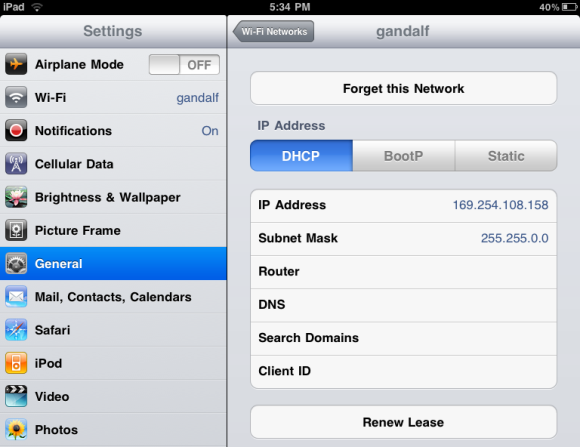
You can check your ipad’s network settings by tapping Settings — Wi-Fi and then tapping the blue arrow next to the Network you’re connecting to. You will typically see an IP address that starts with 192.168 instead of 169.254, and most of the other network fields should have values (Subnet Mask, Router, DNS, etc).
I tried several things that I’ve listed below, but the only thing that really worked was to turn off wireless security for my Linksys router. It’s not as big of a risk as you might think, because my wireless router signal hardly even makes it out to the edge of my small backyard.
To turn off wireless security, you’ll need to log into the administration web page for your wireless access point (http://192.168.1.1 for my Linksys from a computer that’s connected to the router). Once logged into your Linksys, click “Wireless” and then “Wireless Security” and choose “Disabled” as the security mode. Be sure to save that screen before moving on.
If you’re worried about security being disabled, you can turn off SSID broadcasting by clicking “Wireless” — “Basic Wireless Settings” and setting “SSID Broadcast” to “Disabled”. Your neighbors won’t even see that the network exists. You’ll have to tell your ipad what your network name is, but once it’s entered it will remember it.
Other things to try
Here are the other things I tried:
Change the Linksys wireless router’s network speed to B/G mixed instead of the default wireless-n, and the Channel Width setting to 20Mhz instead of the default 40Mhz.
According to this article on Apple’s support site, ipad does not support 40Mhz. Scaling it back to 20Mhz didn’t affect performance and fixed the connectivity issues I was experiencing.
One thing I noticed is that with wireless security turned on (using WPA2 Personal) it takes the ipad a little longer to re-connect to my Linksys wireless access point than my iphone and Macbook. Sometimes up to 60 seconds longer, so be patient and don’t give up until you’ve waited about a minute for your ipad to reconnect after turning it on from standby. With security turned off, the connection time is instant.
My ipad also won’t connect to wifi until I open Safari (again, when I have security enabled – connection time is almost instant with security disabled). That seems to be the thing that triggers the ipad to try to connect, and about a minute after opening Safari it successfully connects and holds onto that connection for a while. Sometimes it drops the connection though, so again I recommend just turning off wireless security until Apple figures out a fix.
Tips from Apple
Here are a few other tips and tricks for solving ipad Wi-Fi connection problems, taken from another page on Apple’s support site:
- Restart your wireless router. This will work temporarily but you’ll still experience the problem after your ipad goes into standby or you turn it off and then back on.
- Turn off wireless-n (mixed mode) and use “B/G mixed” instead.
- Try using WAP security instead of WEP.
- Make sure you’ve downloaded and installed the latest firmware for your wireless router.
- Adjust screen brightness. I’m not sure why this would affect anything related to networking, but it came straight from Apple’s support site (though it didn’t have any affect on my ipad’s ability to connect). Check to see if your screen brightness is set to the lowest level by going to Settings > Brightness & Wallpaper. If brightness is at lowest level, increase it by moving the slider to the right and set auto brightness to off.
- Renew your ipad’s IP address
– Tap Settings > Wi-Fi
– Locate the Wi-Fi network you are currently using and tap
– Tap Renew Lease - Try turning Wi-Fi to Off and then back to On.
I ran into this issue for
I ran into this issue for the past couple days and came across your article today. Thanks for sharing all your testing. In my case I was able to change my router’s wireless security password and that seemed to trigger the iPad to reauthenticate (as I was hoping) and then it properly was able to renew the lease and all seems well again. Not sure how “reliable” it will be long term but thought I’d try that out before turning the security off altogether. Thanks!
Hi Matt. Let me know if
Hi Matt. Let me know if that still works tomorrow after your ipad comes out of standby mode. That was when mine failed, not the initial connect.
In fact, every time I would just reset my router, it would connect fine…. until the next time it came out of suspend again.
Thanks Ricky for the tip. It
Thanks Ricky for the tip. It is working fine for me. It was so annoying to loose internet connection in between.
Thanks
Anil
iPad vs Linksys Router
My iPad finally works great but I had to unlock my network to do it. I also ended up unscrewing and removing the antennas from my router (WRT54GS) thereby weakening the network considerably. It now does not extend to the upper floor of my house but will allow use here at my computer and at a comfy chair in the room next door. I was told that Apple intends to come up with a fix by the end of the month (June 2010) by an Apple iPad techie who has had the identical problem with his since April. He said he was unaware that he could simply unlock his network and was looking forward to going home to try it.
trouble connecting to wifi
My IPad suddenly started having trouble connecting to the wifi in my house, although all other computers are connecting fine. I decided to try your fix in the screenshot, regarding renewing the lease, but when I get to the page which matches your screen shot, there is no bar accross the top that says “forget this network” and no bar across the bottom that says “renew the lease” I cannot find it anywhere. I have tried to reset the network settings under the “general” tab, but that it not working either. What else can you suggest?
ipad wifi
My ipad couldn’t connect to my wifi and the problem was that my wireless access point was using WEP security (because that’s the only security used by Tivo). I bought a new NetGear wireless router to replace my wired one, used WPA/WPA2 security and the ipad connected right away. And all my computers are faster with the new router.
Renew Lease
Thank you! I renewed the lease and bing a bang I have an internet connection again. AMEN!
iPad wi-fi connection
I am connected to my wi-fi at work – IP address is 7.192.19.57. All of the other fields are filled in so it looks fine, but I am unable to connect to the internet – any other ideas?
reset router
resetting the router seems to help out too instead of disabling the security.
my wife just received an
my wife just received an ipad and could not connect to our belkin but after reading your advice i typed in my password exactly as shown with the – marks included worked like a charm. thank you
Pass Phrase
I was having difficulties trying to connect an ipad to my WRT160N Linksys router. My laptops were working fine but my ipad couldn’t connect. My pass phrase was quite long – maybe 32 characters or whatever the max is so I ended up changing it to something under 16 characters and my ipad was then able to connect. Of course I then had to change my laptops so they could connect but at least my ipad worked.
you are a lifesaver!!
thanks SO MUCHHHHHHH for this info!
A HUGE HELP!!!! 🙂
i purchased an iPad this past weekend & had connection issues to my home wireless. i followed our steps & all works perfect now!
ipad
Thank you for your help in getting my ipad’s wireless going again, and mostly a great big thank you for wording it so that the non-computer geeks like myself could understand!
Hi,
I had similar problem
Hi,
I had similar problem several times with my iPhone.
What happens?
My iPhone gets this stupid IP 169.254.xx.xx even if i know my wireless is working just fine with any other devices.
What i do?
I basically set static ip temporary.to do this you need to know the ip pool that your router assigns to any device on your network.
Its usually either sth like 192.168.1.x or 10.0.0.x..
So here it is:
Ip Address :192.168.1.20 (.20 can be any between .2 and .254)
Subnet mask :255.255.255.0
Router :192.168.1.1
DNS :8.8.8.8 ( I usually use Google DNS servers )
Once you switch back by clicking to Wi-Fi Networks button, your device should get the static ip you have assign to it.
Make sure that you didnt select one of the IP addresses which is already in use.
Ps. Make sure you switch it back to DHCP when you try to use some other wifi connections.
from Brazil
You saved me!
Thanks to your post (static IP) I can now surf the web with my iPad!
Tried everything. Looked at
Tried everything. Looked at 50 blogs and apple.com. This saved my life and my two ipads and iphone. Thank You x10^99999
EVEN the Apple gang couldnt
EVEN the Apple gang couldnt figure this one out, but I entered your temp static ID and BAM! Surfin’ like a boss. Thanks for the help, was ready to return my new ipad! Thank you thank you thank you!
~ Christine
Linksys and iPad connectivity
I read through the previous posts and some others on the web, but none of which seemed to work with connecting my iPad to the Linksys Router (WRT54G)….that is until I stumbled across the original connection path when I first bought the iPad.
1) Log in to Linksys Router
2) Go to Wireless Security Tab
3) Select Security Mode: WEP
4) WEP encryption: 64 Bits 10 hex digits
5) Enter a passphrase & generate a key
6) Enter the information from Key 1 as the password for the iPad
7) Enjoy surfing…I hope this helps for you as well.
Best,
Eric
Dell Studio 1557 (64 bit) Windows 7 Linksys WRT54G
OMG – thank you
I just disabled the wireless security, and whiz-bang – I’m really connected now. At this point, I really don’t care if my next-door neighbor can scam a little wireless off of me. I’ve been doing it to the backyard neighbors for years, every time my router futzes out.
IPAD WiFi
When my ipad would not reconnect after returning home, I went into Settings>>General>>Reset>>Reset Network Settings and reset to return to factory settings. Then I returned to Settings>>WiFi and connected to my home router. I did not have to remove the security settings this way. I was unable to just remove the wifi connection to reconnect, I had to go through the reset steps. Hope this helps.
same issue, however if you
same issue, however if you change the wireless channel on the netgear router it should resolve, I changed mine to 1.
sorted.
help
I’m wondering if anyonce can help me, I have an Ipad and I am on vacation, when I use the Ipad at the place I am staying I have internet connection and it works fine, but as soon as I go out or travel in car, the Ipad loses internet connection. Thing is I see other people getting wi-fi access. Am I missing something?
thanks
Ipad disabled with no access
Ipad disabled with no access
though my notebook was
though my notebook was connecting to the wlan but i had difficulty in connecting my ipad to the wlan. i came across your article and as suggested in your article when i disabled the security, it connected perfectly to the wlan. thanks for the article.
Modem/Router/iPad
I just replaced my Actec DSL modem with a Netgear ADSL+ version and my iPad refuses to connect to the internet through my Apple Air Port network…all my other computers connect fine. Not a LinkSys issue but some of the same maxi-? showed up over my cranium. Tried the above with little success. May have to explore firewall conflicts next.
Trouble to connect E1200..
Hey Rick,
I just installed E1200 linksys but failed to access net on my iPad through original SSID “C*****ra” since it cannot connect with it.However, i could connect to the guest with ease.What should i do to connect the same wifi with host(what is difference between the speed the host and the guest offers??)
Fix iPad wifi issues
I had the same problem with my new iPad, the wifi range was really poor. I have spent a lot of time on google, looking for a solution to this. Right when I lost all hope, I came across WIRED magazine and found a review of Pong Research cases. After seeing the great feedback on their products, I bought one and it finally put an end to the problem. It also comes with an improved version of the Apple Smart Cover, which allows you to fold it and stand on 5 different useful positions, and still maintain the sleep/wake function.
wifi network
Just got a new ipad and when I am trying to configure it (first time set up) it seems to be stuck on cycling while choosing a network. It just keeps cycling. I have tried rebooting but it just keeps cycling when it gets to choose a network.
I need help!
thanks
Apple does NOT like to play
Apple does NOT like to play well with others. I have incessantly attempted multiple encryption settings (WEP,,,WPA,,,WPA-2,,,etc etc) on our small network which connects ALL our WIN 7 OS pcs JUST FINE. Through our Linksys routers. Our Linksys routers have the LATEST frimware, so THAT IS NOT THE PROBLEM. we also are using Cisco Aironet AP’s to allow our PC’s to connect wherever they are in the yard (shipping depot). I have done the “forget network” etc etc , power on power off yadayadayada with the I-PAD, password is VALID have set for G protocol on AP’s and 20Mhz…… NOTHING works to get the I-PAD (V10.8.2) to connect to “INTERNET”.. I gets an IP address from the DHCP server (router)so it is on the INTRA-NET, but will NOT access the internet (SAFARI fails to connect)… yet the email will download. huh? (as in WTF?) can’t browse, but hey, mail downloads to device.
Linksys has WiFi disabled, has hard wired cables from Cisco AP’s & Bridges to them. Every other device can access internet via wireless with eaither WEP or WPA-2 encryption and NO PROBLEMS WHATSOEVER, but not the I-PADS.
Would this be a NAT function failure in LINKSYS? hmmmmmmmm…….
oh yeah, and am in Afghanistan so unknown variances in allowable site access (gov’t regulated ISPs you see).