My home computer systems were both recently infected by the MalwareAlarm program, and I captured screen shots as it attacked my system – to show you the kind of grief this program can inflict, and also to demonstrate how to clean your system of malware, spyware, and adware.
My home computer systems were both recently infected by the MalwareAlarm program, and I captured screen shots as it attacked my system – to show you the kind of grief this program can inflict, and also to demonstrate how to clean your system of malware, spyware, and adware.
By the time you finish reading this, you should be able to easily recognize when malware has attacked your system, and will know how to remove it and other threats from your computer.
Here’s my story:
I do a lot of blogging and writing articles for this web site, and I was almost finished with one particular article after spending about an hour tweaking it to my liking. Little did I know at the time that I would soon lose all that work, and would find myself in a serious battle to regain control of my system.
I pressed the Submit button on my post, and all hell broke loose!
First I got a popup notification window in Internet Explorer (even though I have popups disabled), asking me if I wanted to download MalwareAlarm for free, to check if my system has been infected with Viruses, Adware or Spyware.
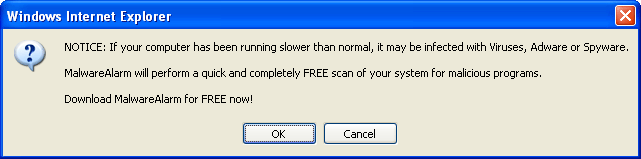
Of course I clicked “Cancel”, but it turns out that it’s MalwareAlarm that I’ve been infected with (well, my computer that is, although I have a sinking feeling that I’m not going to feel so good in the next few minutes). Sure enough, it ignored my Cancel request and immediately displayed a page with progress meters flashing, and my hard drive started humming wildly.

I frantically tried to close the browser but received a message claiming that my system was still infected:
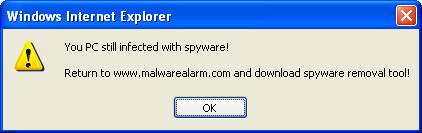
The messages kept popping up after visiting a couple of different web pages as well, so I knew at that point that my system was definitely infected. I have Norton Antivirus installed, but this malware attack breezed right by Norton.
Let’s see what can be learned from this nasty experience, and hopefully avoid it in the future.
To take action against this attack, I ran Spyware Doctor to check my system for malware, spyware and adware infections. I have used Spyware Doctor before (in fact I discussed it in a previous post), but for some reason I had uninstalled it a while back.
After running a scan of my system, Spyware Doctor found over 300 adware, spyware, and malware threats. But more importantly, it found the MalwareAlarm infection which is also called SpywareNo.

Here’s a link to download Spyware Doctor which will scan your system for free and give you a list of all the infections on your system. You might be surprised at how many spyware and malware programs are installed on your system without your knowledge – many of them are programmed to install and remain dormant for a while before rearing their ugly heads.
One thing I like about Spyware Doctor is that it lists the threat level of each infection and a good description of what it can do to your system. In the case of MalwareAlarm, it’s described as “a rouge malware application with false positives, stealth installs and constant pop-ups informing the use to buy the application.” That’s exactly what happened in my case, and I’ll be glad to remove it from my system.
I ran Spyware Doctor’s cleanup feature and breathed a big sigh of relief after receiving confirmation that MalwareAlarm had been removed from my system.
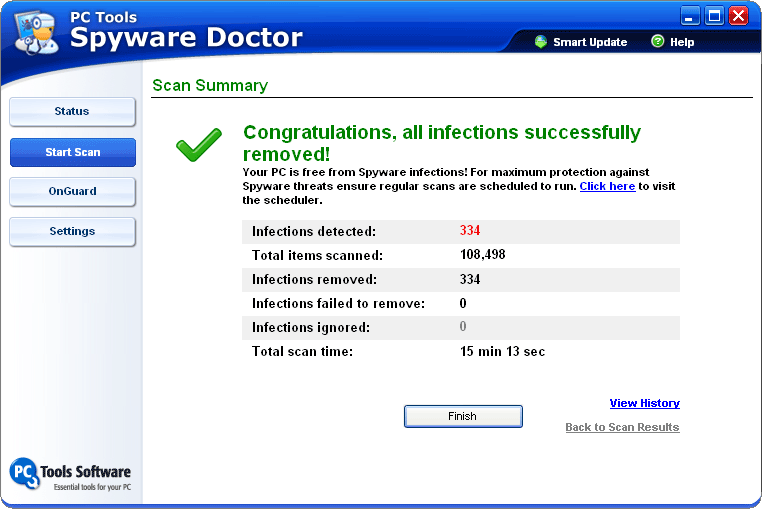
Fortunately there was a happy ending to this story, and as I closed Spyware Doctor it reminded me that it will continue to watch for threats that might try again to invade my system.
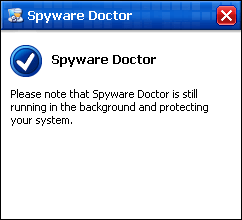
I highly recommend Spyware Doctor to protect your PC against malware, spyware, and trojans like it does with mine.
Here’s a link to get Spyware Doctor for a free scan of your system.
Install Linux and not worry
Install Linux and not worry about any of that!
malwareAlarm2.1
Do you have any idea how I can download a program to disc to remove this? It is on my laptop and I would like to download it to disc from my pc and then install it in to my laptop
Thanks in advance for you help.
You should have been using
You should have been using Firefox, Opera, or anything but IE from the get-go. There are malware programs that will mess with internet functions that all browsers use just like this – another one I’ve seen is one that redirects every google search page you bring up to a different search engine (as well as redirecting away from common download URLs for spyware removal tools). Firefox or Opera won’t get you infected by this stuff, but they can be crippled by it once it’s on your system, so the idea is never to get infected in the first place.
If you absolutely refuse to give up IE, run it in a sandbox: http://www.sandboxie.com/ This will stop malware from being written to the hard drive, so the worst thing you’ll have to do is clear the sandbox.
MalwareAlarm infected Firefox too
I wish it were that easy. I didn’t mention it in the article above, but I did open Firefox and went to the same site and received the same infection. Firefox didn’t protect me any more than IE in this case.
Install Linux?
Yea, because that’s so simple and easy to do…
Linux sucks because it’s so f****** hard to do anything with it unless you have taken 3 years in college worth of programming or using Linux lol
Trust me, I’ve tried using it and it doesn’t work at all for Wi-Fi.
Install Linux?
That’s strange, I’m a lawyer with only one year of programming…… from over twenty years ago.
I had no problems installing Linux.
It also does everything I need for it to do.
Linux is only hard if you’re lazy.
How is logicaly possible
How is logicaly possible that 300 infections came to your computer at the same time? Malware alarm is rougus application. It does nothing except annoing popups.
Syware Doctor the same rougus type of application but they work diferently.
MalwareAlarm does more than
MalwareAlarm does more than just pop up annoying popups (which by themselves are extremely annoying and really get in the way of anything you’re trying to do on the computer, including taking up CPU processing cycles and slowing things down significantly). Do you work for them or something? 😉
I lost a chunk of work because the popup hit right when I went to save the article I was working on, causing me to lose about a half hour’s worth of work.
The reason I had so many infections is that they had been building up on my system for quite a while before I ran Spyware Doctor. They didn’t all hit at once.
Spyware Doctor is not a “rougus type of application”. It’s part of the solution, not the problem.
Wow, I’m glad I googled
Wow, I’m glad I googled Malware Alarm when I did, before any harm came to my computer.
Well, I am on a Linux and
Well, I am on a Linux and Firefox, yet MalwareAlarm popups somehow managed to get to it as well! I have never seen anything like this in my life! It looks like it came through lastminute.com as this is the only site on which MalwareAlarm pops up, so it looks like LastMinute has been infected with this trojan
Thanks for telling me about
Thanks for telling me about this Spy Doctor because that same thing happen to me with mawarealarm 2.1
You’re welcome and thanks
You’re welcome and thanks for commenting on it. I’m glad Spyware Doctor was able to help you out! 🙂
Like Sam above, I just went
Like Sam above, I just went through this from lastminute.com . im running Mac and Firefox. i closed the browser windows when it started showing up fake XP Windows style messages. Mac is going a little doolally recently. do i have anything to worry about- or is this another pesky pc virus that my system will just ignore???
I’m pretty sure it’s not a
I’m pretty sure it’s not a virus – or at least not as far as Mac users are concerned. It’s just an annoying javascript thing that tries to trick Windows users into downloading something sketchy. So I keep on seeing it when I visit a particular site, but not when I visit other sites. My bet is that if anything is infected, it’s that site’s server (unless they’re sketchy enough to host these awful ads…)
I had this same problem on
I had this same problem on firefox yesterday, but it would only turn up when I was on laterooms.com. I used ad-aware se, but I had the problem return today, on visiting the same site.
Thanks for the link to spyware doctor
I got it on laterooms.com as
I got it on laterooms.com as well – is there a problem with their site?
I had the same problem
I had the same problem running Firefox on an Intel Mac. Clicked cancel, got another popup, quit Firefox. Searched “MalWareAlarm” on Camino, shut down and rebooted. Ran ClamXAV and found one infected file, but it was in an old mbox and I don’t think it had anything to do with MalWareAlarm. Haven’t seen any more pop-up windows running either Firefox or Camino. Does anyone know of a Mac program that can detect/remove spyware reliably? I would like to make sure this thing (and anything else) is out of my computer?
Thanks.
i keep getting a mesage that
i keep getting a mesage that i need to buy the full version of spyware docter to deleat the threat, is there a free program that does the same thing?
I don’t know about windows
I don’t know about windows machines, but Linux and mac users are most likely 100% fine. Just don’t panic. What this ad is clearly doing is some malicious javascript trying to trick you into downloading software. First it changes the window dimensions of the website you are visiting and then displays a javascript alert in the lower righthand side of the screen – most likely because that’s where windows alerts show up. Then if you hit cancel, it takes you to a website with a fake progress bar and opens another alert if you try to close the window. When I hit “cancel” again, it crashes Firefox, so I’m guessing it’s trying to do something sketchy that probably would wreak havoc with IE on a PC. I’m trying to figure out how to get out of it before it crashes my browser. Most of what people have been describing so far can be accomplished entirely with javascript, so I doubt you actually have any spyware on your computer (or at least because of this). If you click “OK” and end up downloading something, yeah, I’m sure it’s spyware. What douchebags…
Spyware doctor
Spyware doctor indeed works for scanning the virus out but need to online register it(buy it) to delete the spyware. How can i afford it???
Spyware Doctor Really Works
Hi Ricky, I just want to thank you soooooooo very much about how you have helped me to get rid of that malware alarm 2.1. It was so damn annoying and I had to try and not panic for a second to just try and get my composure back on track. I did everything, the control panel, the symantec antivirus to avg free edition even trying to use my own common sense of past computing programming knowledge and hey, it led me to you.
I am not a computer wizz but I am so very thankful of how very detailed your story of how malware alarm affected you and us the silent and lost gadgets, that it had to take your full description and what actions you took to fix the problem. And I don’t know why I chose to pick your comment and click on your review on how to fix this sort of thing.
Look I really appreciated the step by step help. I’m happy to share my experience of how I have spent 2 days looking at that malware alarm 2.1 covering my icons when I sign in and telling me, that, I have 128 threats or viruses that needs deleting. If you don’t have a dime or a credit card, then SPYWARE DOCTOR, PC TOOLS SPYWARE DOCTOR 5.1 is the way to go. Just have a little faith and perseverance and it will answer your prayers by getting your screen back finally.
Mwah to you my friend, and thanks very much
again. Regards Mkolz.
malwear alarm
hi i have norton and malwear alarm keeps coming up and its not doing anything for my computer, and all its doing is popping up and not helping me at all… how do i get this malwear alarm off my computer without downloading anything
Norton is worthless against
Norton is worthless against MalwareAlarm, which is why I use Spyware Doctor instead. You can’t expect to get rid of MalwareAlarm without downloading anything though – you’ll need to download Spyware Doctor if you want to get rid of MalwareAlarm on your system.
MalwareAlarm 2.1
I have just been to a client’s workplace and took 3 hours to get rid of MalwareAlarm 2.1 from their network. Spybot is the little beastie that did the trick. The client also has Norton (Latest version) and it did absolutely nothing. In fact it was popping up BESIDE the MalwareAlarm 2.1 applet and telling me “nothing is wrong”. How bizzare!! It took a long time but the network is clean now.
I want you to know how
I want you to know how THANKFUL I am. Spyware Doctor is downloading right now. The problem I’m having most is I can never trust the sources who are saying they can help me remove malware. But just reading your blog, the comments and your experiences have assured me. Thank you so much!
do all the problems
do all the problems associated with malaware occur after you restart your computer or immediatley? i had the same popups, but was able to get out of it. i’m running firefox on my pc. after that, there were no problems, no popups, but i’m scared that i have it.
It can happen immediately,
It can happen immediately, but a more popular approach with malware is to infect your system but lay dormant for a few weeks and go unnoticed for a while. Then after a preset time it starts to mess with your system, but by then enough time has gone by that you probably wouldn’t remember which site you visited, and therefore would have a harder time tracking down where it came from.
hey Ricky! i really liked
hey Ricky! i really liked your suggestion but in order to remove the malicious files we need to pay for spyware doctor, right? is there any other alternative that can be used for it?
Spyware Doctor will give you
Spyware Doctor will give you a free scan that lists all of the infections it finds (spyware, malware, etc) along with the threat level (low, medium, high) and an explanation of what the malicious files can do. It also cleans many of them for free, although some of the more dangerous programs require a paid registration to clean.
I have not found any free programs that remove MalwareAlarm, and there’s no way to remove it by just deleting certain files from your system – it’s a lot smarter than that.
Fortunately the price for Spyware Doctor is low, and for me it was worth every penny to get my system back to normal.
Norton is worthless
Malware Alarm is caught by Norton, since Nov. 16.
http://www.symantec.com/avcenter/security/Content/2007.11.16b.html
So it basically took Norton
So it basically took Norton almost 6 months to finally update their software to catch this one – I’m not impressed at all.