Question: I ran defrag on my Windows XP box to hopefully speed things up, but it still left quite a few files that are fragmented. What gives?
Question: I ran defrag on my Windows XP box to hopefully speed things up, but it still left quite a few files that are fragmented. What gives?
Answer: Defragging your hard drive should be like giving your car an oil change and dropping a can of octane booster into your gas tank. It should speed things up and make your system run smoother.
What gives is that the built-in Windows defrag program completely sucks. It’s slow and doesn’t do a very thorough job, as you’ve seen first hand.
The story gets worse with Vista, and the built-in defrag utility doesn’t even show the graph anymore, so you can’t even see how many files are still fragmented. I guess Microsoft decided it would be better to not even show people how ineffective the defragmentation program is!
You’ll get much better results from a third party defrag program like Diskeeper, and better system performance too.
Diskeeper just released their 2009 version, and you can download a free 30-day trial to see what a fully defragmented hard drive really feels like. I ran it on my 160GB hard drive that’s half full, and it took less than 30 minutes to defrag it – much faster than the hours it can take for Window’s defrag utility to run.
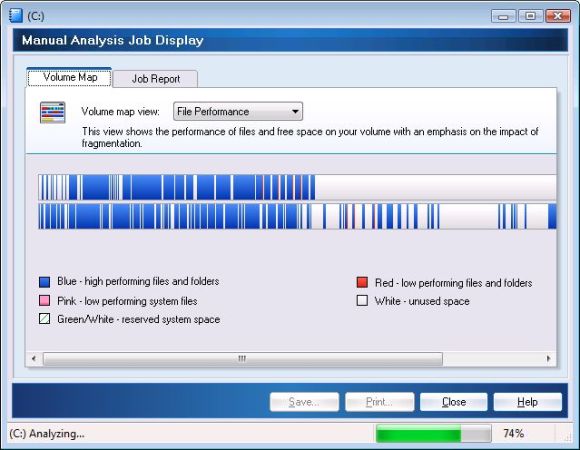
I like that you can see a graph of the files on your system, so you can visualize the defragmentation of your hard drive. Here’s a screen shot of my hard drive after running Diskeeper 2009, showing blue for files that have been defragmented and red for files that are still fragmented (you’ll have to look hard for any red lines):
Wondering what file fragmentation means, and if it can affect your system’s performance?
Disk fragmentation occurs when a file is broken up into pieces to fit on your hard disk. Because files are constantly being written, deleted and resized, fragmentation is a natural occurrence.
When a file is spread out over several locations, it takes longer to read and write. But the effects of fragmentation are far more widespread:
- Slow performance
- longer boot-times
- random crashes and freeze-ups (even a complete inability to boot up at all in worst cases)
Many people blame these problems on the operating systems, when disk fragmentation is often the real culprit.
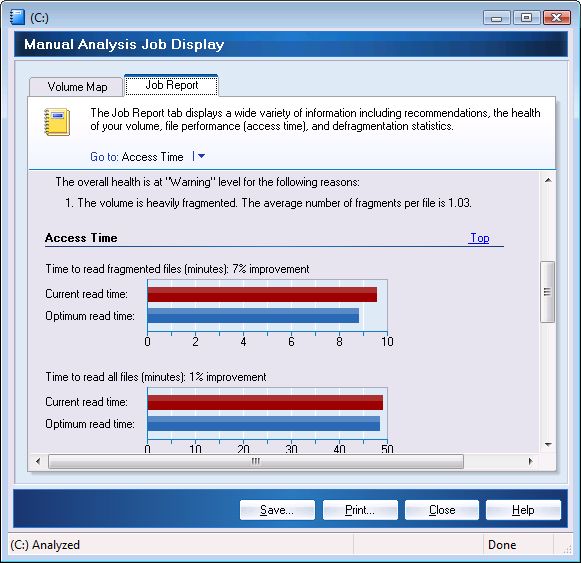
Diskeeper will analyze your system and show you what kind of performance improvements a defragmentation will give you. On my system, it was taking 7% longer to access fragmented files than regular files, and defragging my drive will result in a noticeable performance improvement:
You can run the Diskeeper analyzer free with the trial download of Diskeeper 2009 and see how much faster your system could be performing, and you’ll also be able to see a graph of how scattered your files are on your hard drive.
Diskeeper 2009
Totally agree! I am also running the Diskeeper 2009 trial version and it blows the clunky windows XP defragger out of the water. It defrags much, much faster, and is really thorough too..not a single red line after it’s done. Best of all is the automatic mode; I’ve left it on auto defrag since I installed it, and it never interferes with even highly resource intensive games. No frame rate hits in FarCry2 or GRiD. The resource utilization algorithms of DK 2009 are simply superb.
“Disk fragmentation occurs
“Disk fragmentation occurs when a file is broken up into pieces to fit on your hard disk. Because files are constantly being written, deleted and resized, fragmentation is a natural occurrence.”
In Linux and MAC this is not an issue, although if you want to argue nuance there is some very minor fragging issues. SO minor that most Macs never need to defrag.
“Many people blame these problems on the operating systems”
Operating systems use different file system which work better then others. Windows is stuck on fat32 and NTFS for the most part. You are making very general statements, but you are remiss and should clarify.
Windows defrag = Diskeeper?
Isn’t the built-in defrag Windows provides made by Diskeeper? I thought at least XP uses a “lite” version of Diskeeper which didn’t do as well as other offerings.