How to create a ring tone for free using iTunes
You can create ringtones for free with iTunes using the steps outlined below, and can upload them to your cell phone with a USB data cable or a Bluetooth connection.
I'm assuming you already have your song loaded in iTunes, and you can refer to other articles in the iPods and MP3 Players forum if you need instructions for loading songs into iTunes from your iPod or a music CD.
Set the song length to about 30 seconds
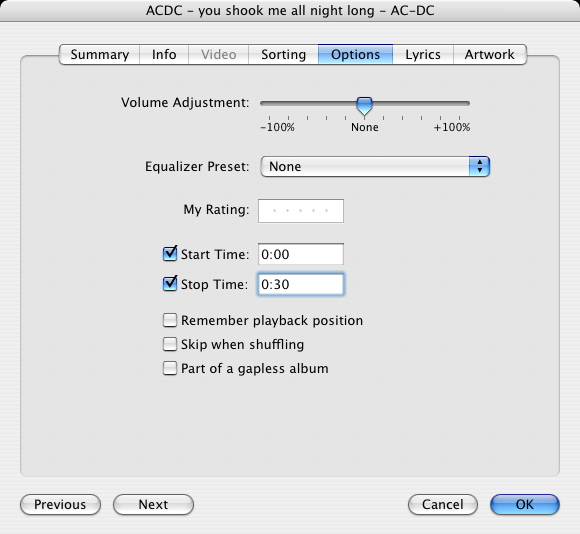
Right-click on the song in iTunes and select "Get Info" from the pop-up menu. Choose the Options tab and change the Stop Time to 0:30 for 30 seconds of play time.
This won't change or damage the actual file; it just tells iTunes to only play the first 30 seconds of the song (plenty of time for you to answer your phone). You can change this setting back to full length after you create your ring tone.
Configure the iTunes MP3 Encoder
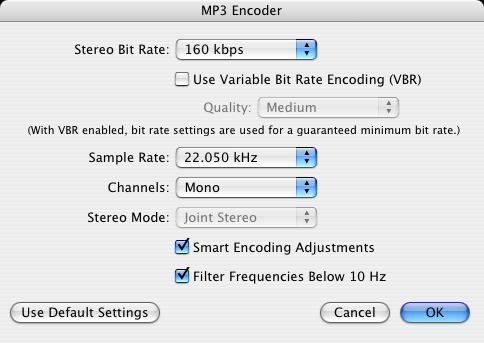
Configure the MP3 Encoder built into iTunes to use 22khz and mono encoding (the format used by cell phone ring tones).
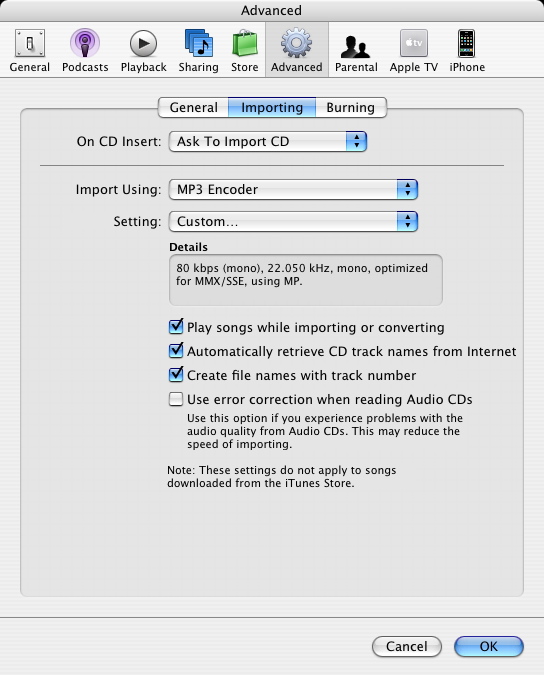
Click the Preferences menu and then choose the Advanced tab. Click "Importing" and then choose "MP3 Encoder" from the Import Using drop down. Choose "Custom..." from the Settings dropdown, which will display an "MP3 Encoder" dialog like the one shown below.


Convert the song to a ringtone
Convert the song to ringtone MP3 format by right-clicking it in iTunes and selecting "Convert Selection to MP3" from the popup menu.
iTunes will make a copy of the song and you'll see that the time will change to 30 seconds. Send the ringtone to your phone using a usb data cable or Bluetooth.
NOTE: Do not select "Create Ringtone", as this option will charge your account, and also only works with songs you have purchased through the iTunes store.
Here's the finished ring tone I created: ACDC-ringtone-you-shook-me-all-night-long.mp3
Transfer the ringtone to your phone
You'll need to download software to transfer your new ringtone to your phone via Bluetooth or a USB data cable, something phone manufactures don't include with their phones. They'd rather you use email to transfer files because then they can charge you for the bandwidth - as much as 10 cents a kilobyte in the case of AT&T. This can cost a couple dollars per ringtone depending on the file size.
Instead, I think it's better to invest a little money up front in a software program that will let you freely transfer as many files as you like, without having to pay any wireless service fees. You'll also be able to use the software to transfer pictures and videos, so it will quickly pay for itself after just a few free transfers.
I recommend a program called DataPilot that works with a USB data cable to transfer ringtones to your phone - it works with all major phone types and lets you transfer multiple ring tones, photos, videos, contacts, etc at a time.
When you run DataPilot, it will open a file explorer window and you'll be able to copy any music files from your hard drive to your phone.
iTunes stores it's music files in your "My Music" folder in Windows XP (under "My Documents"), and in your user folder in Windows Vista (e.g. C:\Users\rickysays\Music\iTunes\iTunes Music).
You'll use DataPilot's file explorer to open this folder and from there you'll be able to select music files and transfer them to your phone.
Another way to transfer your ringtones to your computer is by using a Bluetooth connection, which doesn't require any data cables and works within about a 30 foot distance between your computer and your phone.
Ringtone Media Studio 2 lets you transfer ring tones to your cell phone using a bluetooth connection AND automatically creates ring tones from your favorite CDs and MP3s, without all the manual steps required by iTunes.

RMS will figure out the right place to put your ring tone, depending on the make and model. Just find the ring tone on your computer using RMS' built-in file explorer, and then click the transfer button to copy it over to your phone via the Bluetooth connection.
You can also use RMS to transfer photos and videos to your phone over a Bluetooth connection.
Here's a coupon code for 30% off Ringtone Media Studio: Enter code RMS30 at checkout.
Set your new ringtone as your default ringtone
Now that the ringtone is on your phone, you can set it as your default ringtone.
For the Motorola Razr, this involves entering Settings and selecting Ring Styles. Choose the second option, which ends with "Detail", and scroll to find your ringtone (hint, scroll up instead of down, since the newly added ringtone will be at the end of the list, and scrolling up will pick up the last item on the list).
Other phones will have slightly different menu selections, but the concept will be the same - find the audio file on your phone and then set it as your default ringtone.
With the tricks described in this article you can make iTunes create free ringtones for you, or you can use Ringtone Media Studio to make it even easier to create free ringtones out of your favorite music.
If you enjoyed this article, follow me on Twitter at http://twitter.com/rickysays. Thank you.
- Add new comment
- 648243 reads
Bigfoot (not verified)
Sat, 05/30/2009 - 12:31
Permalink
Ringtone
i have Ringtone Media Studio 3, and my phone is listed on there, and i did all the stuff like i was supposted to to make a ring tone using itunes, but when i go to send it to my phone from my computer using bluetooth, it gives me an error message saying "could not be honored" do you have any idea what that means?
Annie (not verified)
Sat, 05/30/2009 - 21:51
Permalink
Conversion to MP3
When I got to the part where you select "Convert to MP3," that was not an option. Has iTunes updated to remove this? I don't know what else to select. My only option is convert to AAC...
Anonymous (not verified)
Thu, 09/17/2009 - 13:06
Permalink
hey i figured this out. read
hey i figured this out. read my reply to the comment below.
MelRae (not verified)
Wed, 06/03/2009 - 13:36
Permalink
I have the same problem as
I have the same problem as Annie. I only recently installed itunes (5/09), and I cannot find where it allows me to "convert to mp3". My phone is a Sony Ericsson w300i. I have a usb cable that I use to transfer songs to the mp3 player in my phone. Any advice would be appreciated.
Anonymous (not verified)
Tue, 09/15/2009 - 14:58
Permalink
I was puzzled here as well
I was puzzled here as well cause i have a new version, but i found it! go to the very top and click on the "advanced" drop down menu and then select "create mp3 version" from the list.
Bigfoot (not verified)
Mon, 06/08/2009 - 17:30
Permalink
Ringtone
I used Ringtone Media Studio 3 on my wifes LG Rumor and it connects fine and starts to send the ringtone, but when it gets to the end of where its almost done sending, it just stops and doesn't do anything until you hit cancel, and i'm not sure whats causing this, so if you have an ideas, please let me know bud. thanks alot for all your help!
Anonymous (not verified)
Sat, 06/27/2009 - 21:18
Permalink
Hi, I didn't find the
Hi, I didn't find the Importing tab under the Advance tab, I am using itune 8.3, is it different? or am I missing something? Thank you in advance.
Anonymous (not verified)
Wed, 07/15/2009 - 22:28
Permalink
I did everything you said...
I did everything you said... but my computer bluetooth wasnt working so I just emailed it to myself. I'm able to open the file a listen to it but not able to do anything else with it. I have an iPhone 3g.. Can you help?
Ricky
Thu, 07/16/2009 - 00:54
Permalink
iPhones require ringtones to
iPhones require ringtones to be in m4r format, which can still be done using iTunes as described in my other article here: http://www.rickysays.com/make-free-ringtones-for-your-iphone
linda (not verified)
Mon, 08/24/2009 - 10:07
Permalink
the plan i have on at&t for
the plan i have on at&t for messaging supports multimedia it doesn't charge me extra when i send stuff to my email..but one time i used myxertones and it didn't charge me for sending stuff to my phone from a computer, but the text had a link which made me download the ringtone using the web browser from my phone..which i got charged for...
basically, i'm asking if i send it to my phone from my email will the file already be in the message or will i have to download it via the internet?..hope that sense.
Martha (not verified)
Mon, 09/07/2009 - 15:27
Permalink
created ringtone put on SD card
I copied the new mp3 file to my microSD card but can't get it into the ringtones on my phone. It holds it in the Music and Sounds folders. I have a Samsung. Any suggestions how to get it to recognize it as a ringtone? I use Verizon.
Martha (not verified)
Mon, 09/07/2009 - 17:11
Permalink
How to create a ring tone for free using iTunes
I have a Samsung phone, no bluetooth on computer. Moved the mp3 file via my Micro SD card but can't get it into the ringtones. Only music or sounds. Any suggestions?
Anonymous (not verified)
Thu, 11/05/2009 - 08:34
Permalink
YOU ARE MY HERO!
YOU ARE MY HERO!
peaked (not verified)
Fri, 11/20/2009 - 09:29
Permalink
Great info on creating a
Great info on creating a ring tone. I have created several in anticipation of transferring them via bluetooth from my Mac to a Sanyo 7050 cell phone. I have paired them, so they are friends :) But the Sanyo is playing hard to get, and refuses to accept any type of file from my Mac. Any ideas on why this may be happening? Cheers, C.
macuser (not verified)
Mon, 12/28/2009 - 10:59
Permalink
does this work the same for
does this work the same for a mac?
Anonymous (not verified)
Mon, 04/12/2010 - 08:59
Permalink
Yes. Just did it with mine
Yes. Just did it with mine onto my LG Cosmos. Just follow the directions and you will be fine.
Anonymous (not verified)
Sun, 01/24/2010 - 10:57
Permalink
lg dare
hey so i have the lg dare and it automatically saves the file in 'mysounds' how do i get it to save to my music instead?
Anonymous (not verified)
Sat, 03/27/2010 - 23:21
Permalink
I got lost on the 2nd step
I got lost on the 2nd step HA! I dont know what you mean by Preferences Menu...?
Anonymous (not verified)
Tue, 04/13/2010 - 14:56
Permalink
can i pair my phone with my
can i pair my phone with my mac instead of bluetooth?
Anonymous (not verified)
Thu, 04/29/2010 - 11:09
Permalink
I also have an LG Dare, i
I also have an LG Dare, i sent the 16 sec ringtone in .mp3 via bluetooth. My phone saves it to My Sounds and i cant do anything with it because it "exceeds maximum file size" what am i doing wrong? i am on a macbook if that makes a difference.
Thank you for your time
Jeff (not verified)
Mon, 05/10/2010 - 14:54
Permalink
Help making ringones
Empty out files in that folder and try again. Sounds like there could be an issue specific to LG phones check the manufactures website. Also check your cell phone settings for a control related to your problem (highly unlikely). Try the same operation on a Windows based machine. See you get the same result. Try making your ringtone with a different program. With some detective work and troubleshooting you should be able to nail down the issue. Good luck!!
Isaac (not verified)
Tue, 05/25/2010 - 14:38
Permalink
I have a cable and the song
I have a cable and the song in the format. Can I transfer the song without one of the programs?
Anonymous (not verified)
Wed, 05/26/2010 - 17:34
Permalink
I followed this, step by
I followed this, step by step...but it still did not work, for my iphone. It did not give me the option to "use as ringtone". It just made a 30 second copy, which it imported into my ipod section.
Brandon (not verified)
Sat, 06/19/2010 - 19:32
Permalink
Ok, so I've done all the
Ok, so I've done all the steps and am still unable to get the file to work as a ringtone. I'm on Sprint using a LG Rumor Touch. Any suggestions?
Anonymous (not verified)
Tue, 06/29/2010 - 00:31
Permalink
umm
it shows everything up until "Convert Selection to MP3" in the popup menu when I right click... anything I missed?
Anonymous (not verified)
Tue, 07/06/2010 - 21:34
Permalink
iTunes
Have you ever heard of someone uploading a physical CD they had and then being charged for the album from iTunes when they searched for the artwork? I was charged for two albums that I physically own!
Anonymous (not verified)
Sat, 07/10/2010 - 11:30
Permalink
When I right-click to
When I right-click to convert my file to an MP3, there's no "Convert to MP3" option in the little menu that pops up. What do I do to convert the file into a ringtone?
Ocman76 (not verified)
Sun, 08/29/2010 - 17:35
Permalink
If you have a new version of
If you have a new version of itunes, convert to mp3 may be under the advanced tab at the top of your itunes instead.
Anonymous (not verified)
Tue, 07/27/2010 - 07:14
Permalink
how do i send it to my
how do i send it to my phone??
Brian (not verified)
Fri, 08/20/2010 - 09:37
Permalink
Thanks!!!
Thanks for that article. Worked well on my Samsung Impression. Have to use the software that it came with. I now can enjoy StarCraft as my ringtone! Thanks again!
Ocman76 (not verified)
Sun, 08/29/2010 - 17:33
Permalink
This worked for 2
This worked for 2 ringtones,then didn't. I got two ringtones working on my phone, and the the third and forth my phone wouldn't accept as ringtones. I checked my settings in import again and they hadn't changed. What happend????????? WTF
Anonymous (not verified)
Mon, 09/20/2010 - 09:39
Permalink
i would like to make a
i would like to make a rington for my iphone 3gs
Anonymous (not verified)
Tue, 10/19/2010 - 10:41
Permalink
man i need songs on my phone
Sarah (not verified)
Sat, 11/13/2010 - 20:16
Permalink
I, too, am having issues
I, too, am having issues with the conversion to an mp3. When I right-click and select "create an mp3 version" nothing happens. Well, iTunes says it's doing that, but the song doesn't shorten to 30 seconds. Any ideas? Thanks!
Anonymous (not verified)
Thu, 03/10/2011 - 17:28
Permalink
Hey Ricky, I have the newest
Hey Ricky, I have the newest i-tunes and I can't find the general tab or the import settings. :(
Can you help me?
Anonymous (not verified)
Sun, 05/08/2011 - 23:58
Permalink
hint, if you don't see
hint, if you don't see "convert to mp3" you have to change import settings. go to 'edit' > 'preferences' > 'general' tab > 'import settings' > then change 'import using' to 'mp3 encoder. then it should give the option to make into an mp3. hope this helps! :)
Anonymous (not verified)
Fri, 05/27/2011 - 09:14
Permalink
no copy?
So when I click create mp3 version it says converting but a copy of the song is never made and the original doesn't shorten to 30 seconds. What's going on? Thanks :)
Anonymous (not verified)
Fri, 05/27/2011 - 09:16
Permalink
no copy?
So when I click create mp3 version a copy of the song isn't made and the orginal doesn't shorten to 30 seconds even though I set it to. What's going on? Thanks :)
Anonymous (not verified)
Sun, 08/14/2011 - 19:39
Permalink
So far i did everything as
So far i did everything as said, but i dont have the "convert to mp3" i do have the newest vs of itunes and under advanced does not list it either
mariachi (not verified)
Fri, 09/30/2011 - 06:48
Permalink
sync
when i sync 1 ring tone, the itunes needs to back up and then sync everything and this takes 1 hour.
do i make anything wrong or this is normal ?
Brinked (not verified)
Tue, 10/18/2011 - 15:47
Permalink
how do i create free
how do i create free ringtones for an android phone?
anjr0804 (not verified)
Tue, 01/17/2012 - 19:57
Permalink
I was able to make my
I was able to make my ringtone and it works great! However, now when the song file starts to play on it's own (in both iTunes and on my iPhone), it plays like the ringtone, starting in the same spot. I've changed the settings for the song to start at the beginning and I've synced my phone, but it hasn't helped. Any tips? Am I missing a step? Thanks.
kamkarot (not verified)
Mon, 07/30/2012 - 22:01
Permalink
Is it possible for the
Is it possible for the ringtone to be longer than 30 seconds? ..my goal is to have a song play as an alarm..my phone is my alarm clock.
Pages
Add new comment