Apple made a stellar product with the iPod (I own a black 4 GB nano that I use almost every day), but for various reasons they decided to not allow music stored on an iPod to be transferred to your computer using iTunes.
Apple made a stellar product with the iPod (I own a black 4 GB nano that I use almost every day), but for various reasons they decided to not allow music stored on an iPod to be transferred to your computer using iTunes.
For example, let’s say you have music that you copy to your iPod from your home computer, and then you take your iPod to the office and want to copy those mp3 files to your work computer. That seems like a typical thing for someone to want to do, but you’ll find that iTunes doesn’t allow it.
There are a couple of programs that you can use to upload music from your iPod to any computer running iTunes.
MediaPilot software allows you to backup, edit and transfer music & video between your iPod and PC, and also works between your cell phone and PC.
You can also use it to backup your ipod in case you damage it or lose it. Let’s hope that never happens, but if it does then you’d be able to recover your music from the backup that you made.
Here’s how it works:
- Plug your ipod into your computer and make sure it’s set to manually sync music files (iTunes will run when you plug in your ipod, and you’ll see your ipod show up on the left window in iTunes. Click your ipod in itunes and select the option to “Manually update music files”)
- Run MediaPilot which will show you an ipod explorer screen, showing the music, playlists, and videos on your ipod.
- Highlight the files you want to transfer to your computer and drag them over to your ipod link in MediaPilot.
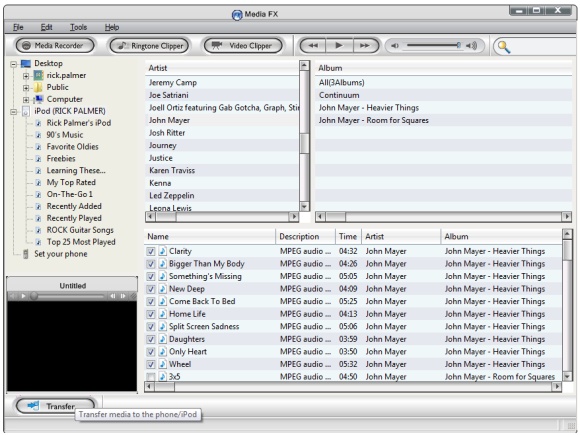
Being able to use this program to transfer music files to your cell phone is a nice plus, and it also lets you create ringtones from your existing songs in iTunes.
Here’s a coupon code for MediaPilot. Enter promo code M0707CJ at checkout to get 20% off MediaPilot, which brings the price tag down to about $15.
iPod 2 iTunes also bypasses iTune’s limitations and lets you copy songs and playlists directly from your iPod to iTunes.
Here’s how to use it:
- Plug your ipod into your computer (which will launch itunes)
- Run iPod 2 iTunes. It will show your iPod on the right and iTunes on the left.
- Select the music files on your iPod and then click the arrow to copy them over to the iTunes folder of your choice.
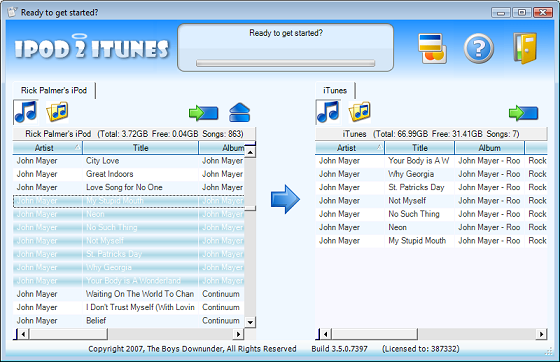
That’s about as easy as it gets, and exactly the kind of thing that should be included in iTunes. Are you listening Apple?
You can also copy the playlists from your iPod to your computer with this program.
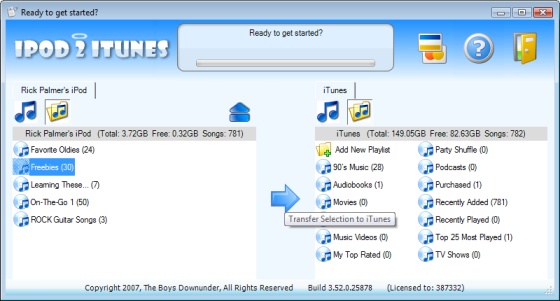
iPod 2 iTunes supports all types of iPods, including the latest 6th generation models, and it works great on my nano. I used it recently to transfer music from my nano to my wife’s laptop, and then from my wife’s laptop to her new iPod that I gave her for Valentine’s Day.
Here’s a download link for iPod 2 iTunes: Download iPod 2 iTunes.
Another similar program called iPod 2 iPod lets you transfer music files between two iPods. Just select the music, playlists, photos, or videos that you want to transfer, and drag them over to the other iPod.
Here’s a flash video of the program in action. Click the demo to view a full size version.

iPod 2 Computer
What software can I use for the Mac?
sync from phone to pc
How can I download music from my Verizon V Cast cell phone to my pc (Win XP Media)? I lost all the tunes that were on my pc, so I want to reload them back from my cell phone to Windows Media Player 10. Any suggestions?
many thanks dude I could not
many thanks dude I could not find a single one that I didn’t have to pay for!
need help
i need help i can i download my pictures from my desktop computer to my ipod
ipod2pc
Thank u very much. Do u know where I can find free software? My wife says I’m not allowed to buy anyting on the net, even if it is only a penny.
Help! -running ipod2itunes
After I downloaded ipod2itunes and tried to run it (I’m using the evaluation program for 7 days because I was not given a code), and an error comes up saying I must have itunes 7.1 or higher for this application to run. I’m using itunes 8 so there shouldn’t be a problem. I have 7 days to figure this out. Can you please help me or is there another free program I can download to transfer music from my ipod to itunes? Thank you!
Thanks for those
Thanks for those applications mate. I was wondering how it could be possible that Itunes don’t allow to download music from iPod to my pc. I thought it can’t be like that, so I was trying to do that all day long. Thanks for showing me the path. I will download one of those two apps and try to download my music to pc one more time. Thanks for the great article. I will be looking forward to another great ones from you.
Sincerely,
Travis Bagdon from iphone application development
how do u set itunes to sync music
please tell me how to set yer itunes to sync music! that the only problem i have!
TouchCopy is another good
TouchCopy is another good option – it works on a PC and a Mac. Also, it will transfer literally all your iPod content – music, videos, photos, contacts, calendars, games,…
I downloaded ipod 2 itunes
I downloaded ipod 2 itunes and my itunes pops up but my ipod doesn’t it keeps saying connect ipod.Can someone help?
Excellent post. And perfect
Excellent post. And perfect timing. I passed this post along to some friends who were debating about the same topic. I concur with your conclusions and will eagerly look forward to your future updates. I will try to download those apps and once i use than will tell you about my experience with it.
Thanks & regards..
Adriana from Mobile Application Development