I recently bought a new iPhone and want to copy all my contacts from my old phone to the new phone. I have quite a few and don’t want to have to type them each into the iPhone as it would take forever. Is there a fast way to do this?
Question: I recently bought a new iPhone 3G and want to copy all my contacts from my old phone to the new phone. I have quite a few and don’t want to have to type them each into the iPhone as it would take forever. Is there a faster way to do this?
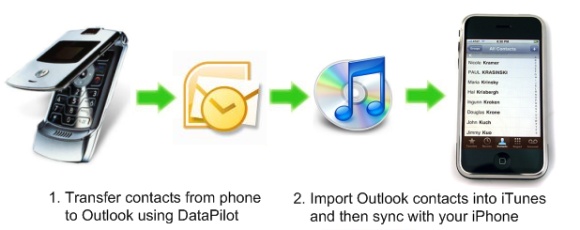
Answer: Yes, there’s a much faster way to do this by using your iPhone’s ability to sync with your Outlook contacts. If you can download your old phone’s contacts into Outlook, Outlook Express, or Windows Mail for Vista users, then you’ll be able to sync them to your new iPhone using iTunes.
What you’ll need
1. iTunes loaded on your computer (free from Apple).
2. USB data cable to connect your phones to your computer.
3. Software like Phone Tools or DataPilot to transfer contacts from your old phone to Outlook or Outlook Express, which iTunes can then import into your iPhone.
How you’ll do it
1. Connect your old phone to your computer with a USB data cable. If you don’t have one that came with your phone, you can find one on Amazon for about $10 or less.
2. Copy your old phone’s contacts to your computer using DataPilot, which works with all major phone types (download here and install on your computer).
DataPilot copies your contacts from your old phone into Outlook, Outlook Express, or Windows Mail if you’re using Vista. Then iTunes can import these contacts into your iPhone.
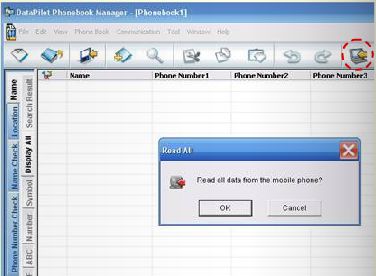
3. Run DataPilot and click the Read All button to load all of your phone’s contacts.
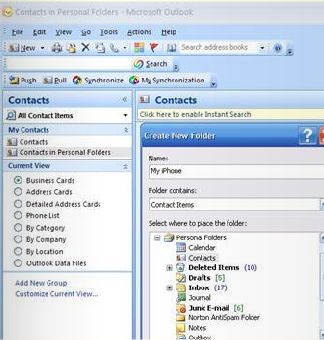
4. Open Microsoft Outlook and create a new My iPhone folder in your Contacts. This will also work in Outlook Express.
5. In the DataPilot Phonebook Manager application, go to the File — Export Address Book menu and choose Microsoft Outlook or Outlook Express.
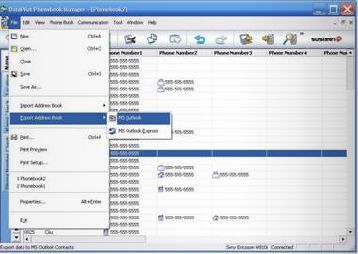
6. The Export to Outlook screen will show up. Choose the My iPhone contacts folder as the destination (created previously), and click OK.
Now your addresses will all be in Outlook and the last step will be to sync them with your iPhone.
7. Plug your iPhone into your computer and wait for iTunes to automatically launch (or run iTunes from the Start menu if it doesn’t).
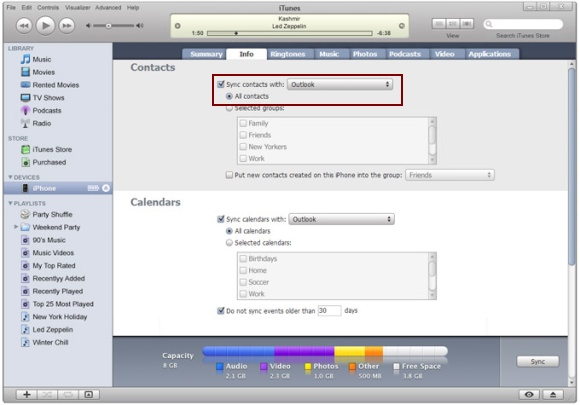
8. Go to the iTunes Info tab and click the checkboxes to sync your contacts. Choose Outlook as the application to sync with. Click Apply, then click Sync.
You can also use DataPilot to transfer photos, videos, and ring tones from your old phone to your iPhone the same way – by transferring them to your computer and then importing them from your computer to your iPhone.
I have the 1st generation
I have the 1st generation iphone. When i download an application it comes up on my applications in my itunes. How do i get those applications onto my iphone?
Any ideas much appreciated.
There’s a big difference in
There’s a big difference in price between the DataPilot Tunes/Pics and the Cell Phone Data Transfer product…will the general Data Pilot Tunes/Pics/Flicks work?
what if your old phone is so
what if your old phone is so old and does not have a USB port. how do i transfer contacts to the new Iphone using a mac?
If you don’t have or use
If you don’t have or use Microsoft software on your PC, this advice doesn’t help. I use Firefox and Apple doesn’t seem to want to recognise that.
Easy to do
Thats so easy to do, thanks for that, would be even easier if Apple put this in ther instructions
I’ve found an app in the App
I’ve found an app in the App Store which has copied 300+ contacts from my Nokia E72 to my new iPhone 4S in two minutes; no Outlook and no cable were required. I had to download a Java applet to the E72 which uploaded the contacts to the “cloud”, given me an access code, then install the app on the iPhone, enter the access code and boom, my contacts appeared on the iPhone. Not perfect though, since only two phone numbers were copied per contact (so I’ve lost some details in transmission), but still saved me quite some time and headache. The app is called “ConCopy”.