Here’s how to transfer contacts from your old Blackberry to your new iPhone, and without buying anything extra along the way (completely free solution).
Just traded in your Blackberry for a shiny new iPhone? Here’s how to transfer contacts from your old Blackberry to your new iPhone, and without buying anything extra along the way (completely free solution).
We’ll do this in two main steps:
1. Transfer contacts from the Blackberry address book to Outlook on your computer (or Windows Mail).
2. Sync your iPhone with your computer using iTunes, which will transfer the contacts from Outlook to your iPhone.
Make sure that both the Blackberry Desktop Manager and iTunes are installed on your system, and that your Blackberry is connected to your computer with a usb data cable.
1. Transfer contacts from a Blackberry to Outlook
Run the Blackberry Desktop Manager program and click “Synchronize” from the main menu screen. Select “Synchronization” below the Configuration menu option to get to the Synchronization Configuration screen.
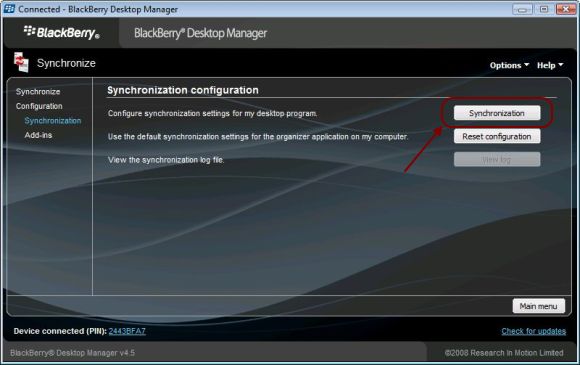
There you’ll click the “Synchronization” button to configure the synchronization settings. (that was a mouthfull of synch-related words wasn’t it? Hang in there)
You’ll be asked to choose the device applications to synchronize. Choose “Address Book”, and then choose “Outlook”. If you don’t have Outlook on your system, then you can choose “Windows Mail” instead.
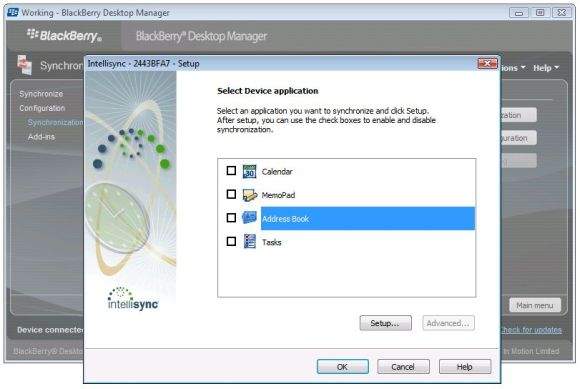
Next you’ll configure how you want to sync your contacts, either bi-directionally or just from your blackberry to Outlook (which is the option I chose):

Click “Next” and then “Finish” to complete the synchronization settings. This will take you back to the synchronization screen.
Make sure you check the option to “Synchronize organizer data”. This is the setting that tells the program to sync your contacts.

Click the “Synchronize” button to copy the contacts from your Blackberry to your Outlook contacts. You can open Outlook after the sync has completed, and you should see your Blackberry addresses in your Outlook contacts folder.
2. Transfer contacts from Outlook to an iPhone
You can import Outlook contacts to your iPhone by syncing your iPhone with iTunes.
Plug your iPhone into your computer and wait for iTunes to automatically launch (or run iTunes from the Start menu if necessary).
Select your iPhone in iTunes, select the Info tab, and then click the checkboxes to sync your contacts. Choose Outlook as the application to sync with.
Click Apply, then click Sync.
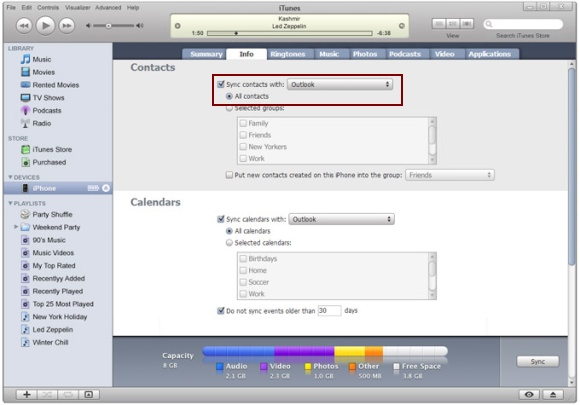
This will copy the contacts from Outlook over to your iPhone. Remember however, that you can only sync your iPhone with one computer at a time. If you later decide to sync with another computer, your contacts will be erased.
Our work here is finished, and your Blackberry contacts will now be copied over to your iPhone.
Thanks! Saved me $10 bucks!
Thanks! Saved me $10 bucks!
Transfer contacts
I had been struggling to copy my contacts from my blackberry to my IPHONE!
YOU WERE DEFINTELY THE SOLUTION !
IT WAS JUST FANTASTIC, EASY AND FAST.
THANKS FOR YOUR HELP
Transfer Blackberry Contacts to an iPhone
Rich Says ~ Thank you so much for this information! Worked like a charm. The only reason it took me awhile to transfer is that I had the Blackberry Manager on my work computer, not home. After going through the new install on home comp, Only took about 30 secs for me to load my info from my Crackberry to my new iPhone!
You saved me a great deal of time and headache! THANK YOU SO MUCH!!!
It shows no applications
It shows no applications configured for sync when i try and sync it .
My blackberry was stolen and
My blackberry was stolen and now changed it for an Iphone, can I recover my contacts? I had made a security copy but not able to find the contacts on my pc
Thanks!
BB > IPhone
Thanks for the detailed instructions. I now need to transfer the calendar from the BB to the IPhone. suggestions?
BB Desktop Manager on Mac
Hi Rick,
The BB Desktop Manager on my Mac is acting up, each time I launch it, it tells me there is a newer version of the software and when I try to install the new version I downloaded it doesn’t work.
Can you proffer any solutions?
Kelechi
don’t have Outlook
I don’t have Outlook and don’t plan to use any Micro$oft products.
Any other way?
Amazing rec. Just switched
Amazing rec. Just switched from my storm2 to the iphone4gs!
THIS WAS AWESOME!!!!
THIS WAS AWESOME!!!!
perfect
Rickysays and Ricykdoes -nice – many thanks
export data from BBerry to iphone
I use Yahoo for my email, not Outlook. Can I still export my Bberry information to my iphone? Help please!
Thank you!
You made it so
Thank you!
You made it so easy. So clear and easy to understand!
Worked perfectly. I synched
Worked perfectly. I synched through Windows instead of Outlook and everything moved over to my iPhone without a hitch. Thanks!
YOU ARE MY HERO
you are my hero! I had 300 contacts and could not figure this out for the life of me. Thank you!!!!!!!!!!1
thankyou!!!
Dude, this was UNREAL! I’m a journalist so had a good few thousand contacts I thought I wasn’t going to be able to save to my iPhone without getting a new SIM card (I cancelled my original SIM card from BB and got a mini-SIM for my iPhone, therefore missed the easiest way of transferring contacts by using gmail Sync.
Thanks again!
Thank you soo much, no fuss
Thank you soo much, no fuss very straightforward
Transfer Blackberry Contacts to an iPhone
Perfect data transfer from Blackberry Bold 9700 to Iphone 4S!
Thank you so much it saved
Thank you so much it saved my life!
great!! works and it took me
great!! works and it took me less than 10 minutes. recomended
BB Contacts to iPhone 4s
Hey Ricky – Worked like a dream. Thanks a stack!!!
Dear Ricky,
The contacts did
Dear Ricky,
The contacts did copy but the phone numbers saved under the field ‘OTHER’ in blackberry did not appear in the iphone contacts. Please help urgently….
Worked like a charm! Thank
Worked like a charm! Thank you very much!
Blackberry sync to iPhone
Just wanted to say, THANK YOU, THANK YOU! IT WAS SOO SIMPLE AND QUICK UPDATE!
Will this process work with
Will this process work with an Ipad?
There is a online service,
There is a online service, called iCM Code (https://icmcode.com/) that let’s copy all your contacts in 2 steps. It’s not free, you have to buy an app for 2$, but works great.
Just tried to transfer BB
Just tried to transfer BB contacts to I phone and fell at the first hurdle. The “synchronisation” button on the sych configuration screen is grey out and not working. Help!
Hi Rick,
Thank you. The
Hi Rick,
Thank you. The tutorial works and runs well.
You have made it so easy to do.
Thank you. it worked so well
Thank you. it worked so well
I used CopyTrans Contacts
I used CopyTrans Contacts to transfer my old BlackBerry contacts to my new iPhone 5. Worked like a charm.
i love you for this
i love you for this
After a long search and frustration
Your article has helped me a lot! I managed to copy 865 contacts to my iPhone. (Can’t imagine if I have to input it one by one)
It was a bit of work as my PC has an outdated version of iTunes, and I have never install Blackberry Desktop Software before. However, it was worth the effort though..
Good job and thank you for sharing this to the world! Much appreciated..