I have Comcast internet at home with a standard-issue Motorola cable modem, and it seems that Linksys routers don’t play nice with these modems. Here’s how to fix the problem.
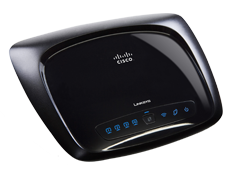
I upgraded my wireless home network this weekend from an old Netgear 802.11b router to a shiny new Linksys WRT120N router sporting the latest 802.11n technology, and a much sleeker design.
The network speed difference is very noticeable and significantly faster on the newer router, and the units were on sale for only $39 at Fry’s so it seemed like a steal of a deal… until I tried to install it.
I have Comcast internet at home with a standard-issue Motorola cable modem, and it turns out that Linksys routers don’t naturally connect directly with these modems.
 The Network Magic software that comes with Linksys routers failed on the first setup screen with an “Error 321”, claiming it could not detect my ethernet network adapter. Apparently the Linksys routers require you to connect through a separate router that sits between the Comcast modem and the Linksys router (or at least that’s what I found hidden somewhere in the documentation) – and in fact, it worked fine if I connected through my old Netgear router to the Comcast modem.

I was also able to connect directly from my computer to the Linksys router, which I was able to verify by running ipconfig and seeing the IP address assigned by the router. I was also able to log into the router’s admin console screens by opening a web browser and entering the IP address of the router – http://192.168.1.1 using admin/admin for the username/password (which is the default for Linksys routers).
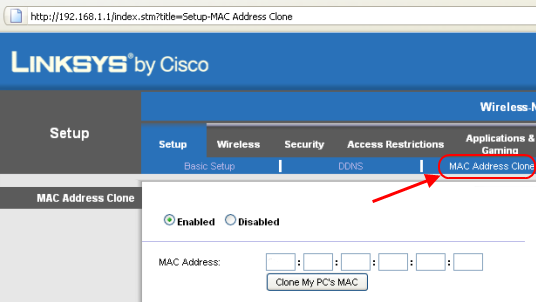
So the culprit was the connection between the Linksys router and the Comcast modem, and the solution was to make the Linksys router clone my computer’s MAC address (which made the Comcast modem think it was connecting directly to my computer instead of to a Linksys router).
Here are the steps to take to get a Linksys router to connect to a Comcast modem:
1. Unplug your computer from the cable modem and power down the cable modem (I even took the battery out from the backside, to make sure it was completely off).
2. Connect your computer with the Linksys router using the network cord, leaving the router unplugged from the cable modem.
3. Open a command prompt and enter “ipconfig /release” and then “ipconfig /renew” to get an IP address from the router.
4. Enter the router’s admin console by pointing your web browser to http://192.168.1.1 (default IP address for Linksys routers). The default login for Linksys routers is admin for both username and password, if you haven’t already configured an admin password.
5. Instruct the router to Clone your Mac Address, which is under the main “Setup” tab.
6. Connect the Linksys router to the Comcast cable modem.
7. In the Linksys router’s admin console, request a new IP address from the cable modem. (This is the “Renew IP Address” button in the “Status” tab of the admin console)
The Comcast cable modem should now think it’s connecting directly to your PC and your Linksys router should now be working.
As for the Network Magic software that came with the Linksys router – I tossed it.
As for Linksys technical support – also worthless. I spent about 15 minutes on hold, only to be disconnected.
I also read stories online about Linksys tech support requiring customers to pay 10 bucks for remote connection software so they could log in and perform the same steps that I just described above, that you can easily do yourself.
Comcast FTW? WTF!
I have dealt with the same issue a few times setting up a wireless router for some friends, and used the same solution you have described.
The interesting thing is that it was not Linksys that pointed me in the right direction, but Comcast’s technical support. Let it be known that I am no fan of Comcast, and stay away from them as much as possible. But they helpede solve this problem more than once.
Ryan, did the Comcast tech
Ryan, did the Comcast tech charge you anything for an application that would allow him to remotely access your computer?
I saw a few threads on google where that had happened.
There are many disreputable
There are many disreputable call centers that “hijack” 800 numbers from various companies. I used to work at one. Despite the system answering the call with our company’s name, by the time the customers spoke with a salesperson and then to a tech, they thought they were talking to Symantec or Dell.
You ROCK. Comcast sucks.
Let me just say, this post was just the piece of awesome sauce I have been needing for the past seven hours. Today has been one of the most frustrating computer troubleshooting days ever – and I’ve had a number of them.
It began at 10:30 in the morning when my standard-issue Comcast, Motorola cable modem suddenly stopped communicating with my trusty Linksys WRT54G router. No changes to the settings, no power outages, no explanations, just no connectivity from the router. Modem still had internet, but once I connected it to the wrt54g OR my old (hacked) Vonage/Linksys 31P2 router – nothing. Tried renewing DHCP – no results, could not get an IP address from the modem.
I went to my folks house down the street and tried my router on their Comcast modem – same results. But, then, I put connected my router to theirs (Comcast–>parent’s router–>my Linksys) and “presto,” everything worked just fine.
What ensued was an afternoon of Googling, fiddling, changing all sorts of settings, upgrading firmware, and finally, the dreaded customer support call to Comcast.
If I could throttle somebody, I would have. “Not our problem. Call Linksys. You must have done something.” Yeah, right, like all of a sudden, BOTH my routers go bad?! They claim that there hasn’t been a firmware upgrade on those modems in a year.
I had just about given up and was ready to cancel Comcast altogether – which is a dream of mine – when I happened to search Twitter and found the link to this post.
Never thought of cloning the MAC address of my computer. (I actually tried cloning the MAC address Comcast router to no avail). Not sure why it works, but it does. Don’t know why it decided to crap out today, but it did.
Seven long hours later, my router is humming along, again.
Thank you!
I’m really glad this worked
I’m really glad this worked for you.
At first I was convinced it was a faulty Linksys router, because I could get wifi from my old Netgear router just fine – connected to the Comcast modem. On a whim I tried daisy-chaining the Comcast modem to the Netgear router, and then finally to the Linksys router. When THAT worked, then I knew the Linksys router was working fine and that something was wonky with the Comcast modem.
And just to be sure, I plugged my computer directly into the Comcast modem and that worked fine… so then it made sense to try the MAC address cloning to make the Comcast modem think it was still talking to my computer directly.
Thanks for posting the detailed steps you went through. Hopefully this article and your comments will help many others as well! 🙂
I think Comcast does it on
I think Comcast does it on purpose to get you to pay for their advanced tech support. had my internet through them for 9 months now and yesterday without warning at exactly 4pm my internet stops working.
After sitting on hold for 45 minutes because as the pre recorded message states they were having a unusually high amount of calls. I finally get through to a tech and after 40 minutes of “troubleshooting” the only thing I learn is I can actually get on the internet with a direct connection from the modem to my computer. The tech tells me that for 29.99 or something I can get better tech support from comcast. I pretty much hung up right then and there because since I have the internet I know a 3 minutes search will solve this problem, and it did.
Cloning my computers mac address immediately worked. After I was connected I double checked by disabling it, and it stopped working immediately.
Seems pretty fishy that after 9 months of service it just stops working out of the blue with no power outage or router restart, or modem restart, or even my modem losing internet connection, and their garbage tech support wants to charge me a huge fee to have them set it up.
Connecting a Linksys Wireless Router to a Comcast Modem
I too also was doing a home network upgrade and purchased a DOCSIS 3.0 Comcast cable modem at a local Bestbuy.
I already have a direct debit payment cable package with them and am registered at their site. so I “assumed” that all will be a breeze. WELL, to make matters short I hade trouble entering my new data online so I had to called a Comcast agent for help.
He was very pleasant and he to had to enter all the data as the web page would not accept it. Anywhos since I had him online I asked about piggy-backing my wireless Linksys (WRT160NV1….actually DD-WRT upgraded as with the original formware I could mnot get a local HOMEGROUP network to form; WIN7, X64, Ultimate))on to the system and was informed to just run the linksys install disk as it was a breeze (breeze…I believe he was…LOL).
So needless to sat it did not work and after 2 hours went to bed. This AM I was searching on this problem and came across your blog. Ten minutes, done, on line and thanking you from my laptop, drinking my Sunday coffee from my easy chair.
The only thing I may add was I had to config my IPV4 address to ststic to get to routers web site). After following the remaining steps a nd rebooting the modem, router, PC in that order I am surfing….
Thanks, appreciate….(whew)!
Thanks for this router info.
Thanks for this router info. I couldn’t figure it out and I was about to call comcast when I stumbled on to this fix. I was around 7 hours into this mess and you had it fixed in less than 3 minutes. Take the Jets+6 this week against the steelers. Thx again.
Linksys VS Comcast Modem
My Cisco router, a linksys, worked fine for four years with Time Warner’s cable modem. When I moved out of Time Warner’s area to Comcast’s I expected no problems. When the installer came out, a former Time Warner Employee, he advised me that I should invest into my own modem, that the Comcast one wasn’t worth the money to rent. I haven’t done so as of yet, due to the cost of moving. Well my linksys which ran perfect for over four years with Time Warner’s modem is now having problems. Sorry Ricky, you can say what you want, but I can’t blame Linksys. Their routers worked well with Time Warner, and before that four years I had an ATT DSL modem with another Linksys router for two years, and no problems. So the problem lies with Motorola’s Modem in my opinion. I can’t wait to purchase my own modem, and save the money that comcast is charging for this modem.
Same Problem
I had the same issues with my Linksys WRT160N. Like most of the others here, many hours wasted. Then, I stumbled upon this post and tried it. It worked like a dream. This is the second router I have had this same issue with. The first one I replaced and figured it was a power surge from a storm that caused it.
Such a simple fix to a very frustrating problem.
Linksys router/Comcast modem problem
I had a similar problem yesterday with my Linksys WRT160N v3 router and the Comcast modem. The Cisco technical support helped me install the new router about 2 years ago. Yesterday we lost Comcast Internet/phone service in the area – as usual. When the service was restored, the Internet stopped working. I called the HP tech support, Comcast support and Cisco support. Comcast support made me connect their modem directly to my PC and it worked. Since they do not support the router, they suggested I contact Cisco/Linksys. Cisco wanted me to pay $30 to extend the tech support or buy their new router for $50. After much frustration, a friend referred me to this web page and got the router to work as before. Greatly appreciate the information here.
Another success story
Just worked with my WRT110. What a crazy, frustrating problem. Wasted about 4 hours today…
Thanks so much for the
Thanks so much for the advise. I was having the same problem on my mac computer. I tried steps 1, 2, 4 and 5 (not 3) and it worked.
Thanks so so much again!
Thank you so much for these
Thank you so much for these instructions! You just saved the day for me yesterday. I had Comcast internet service installed and couldn’t get my wireless router to work with it. They wanted me to pay $6/month for their “Signature Support” to troubleshoot it. I said, “No thanks” and turned to Google which led me to your page. Your instructions worked perfectly!
Great Tip!
Thanks for posting this article. Got my network back up and running thanks to you!
I spent a few hours
I spent a few hours communicating with Comcast technical person trouble-shooting the Motorala cable modem with Cisco E2500 router, fail. Finally I found this and it really helped me out. Really appreciate it!!!
ciso
I have a cisco router and comcast modem my daughter had it plugged in but we moved it and they unplugged it all and left it up to me to replug everything well I dont see where the router goes there is no place to plug it in to fit the blue cord the only place is where the modem is plugged into computer ,
I have the computer up and running but no router for the cell phones
Thank you worked perfectly
Thank you worked perfectly and so easy to follow your directions you saved my Christmas since it is a Xmas eve set up as a gift
Wow! this just helped me too!
Wow! this just helped me too! thank you!
Awesome post, you saved me a
Awesome post, you saved me a lot of time!!
YES! It worked. Thank you so
YES! It worked. Thank you so much for your help!
Different router model, same
Different router model, same Comcast/Xfinity, same solution worked like a charm! Delighted!
The MAC adress cloning did
The MAC adress cloning did not work for me. I could get to the Internet by connecting directly to the Comcast modem. When connected, I checked my IP address, and lo and behold, Comcast was giving me an internal number of 192.168.1.x. Same subnet as my router was on. I changed the LAN address on the router to 192.168.2.1, renewed my IP address…and BAM, Internet!
Great instructions. My only
Great instructions. My only mistake was not saving the settings after cloning the MAC. Took me a while to figure out this error, but otherwise very easy.
Thanks to your comment I
Thanks to your comment I realized I was making the same mistake. Everything is working perfectly!
Thanks
2-9-16 Had the same problem
2-9-16 Had the same problem with my Linksys E2000 router connecting to Comcast with my Motorola SB6183 modem. My laptop had a problem letting me use step 3 so I just used steps 1, 2 & 4. Powered up the modem and got a cup of coffee while waiting for it to come up. I instantly had WIFI internet (I then used the startup disc and work great. In less than 10 min, using the disc, I had the a secure network set up with username and password and wireless printer configured along with my cell phone and note pad. I spend a LOT of time over 3 days trying everything; Phone calls, setting up IP addresses, nothing worked. Was ready to set fire to the whole house and walk away. THANKS FOR YOUR POST
I just used the principles
I just used the principles described here to make my new Xfinity/Comcast connection operate. Equipment:
1. Netgear CMD31T Cable Modem, connected by RG6 cable to Comcast;
2. Netgear ADSL N600 Wireless Dual Band Gigabit ADSL2+ Modem Router DGND3700v2, connected by Ethernet cable to CMD31T.
Xfinity/Comcast was issuing exactly ONE DHCP IP, so connecting the CMD31T to an ordinary switch yielded exactly ONE Internet connection. By telling the N600 to impersonate my workstation, it is now working as a backend router for the CMD31T. Under the N600’s Advanced->Setup->Internet Setup menu, I set “Router MAC Address” to “Use Computer MAC Address.” Then under Advanced->Administration->Router Status, I clicked the “Connection Status” button in the “Internet Port” subwindow. This brought up a window with “Release” and “Renew” buttons. I clicked “Renew”. After a minute or so, the N600 had acquired the IP address Comcast previously assigned to my PC. A little later, the “Internet Port” subwindow changed from inactive to active, using the IP and MAC formerly owned by my PC. I then logged in to my PC and ran “ipconfig /renew” and my PC learned its IP and routing info from the N600.
So, thanks Ricky and other contributors here!