Here are a few handy shortcuts for Blackberry email that most Blackberry owners just won’t be able to live without.
1. Mark All Messages As Read/Opened
Select the most recently dated email in your main email folder (the one at the top).
Press the menu button, and choose the “Mark Prior Opened” option.
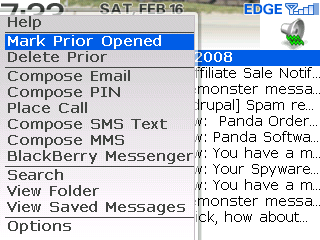
All of your email messages will be marked as opened, taking your message counter back down to zero (perfect for obsessive-compulsive guys like me who just have to keep track of new messages vs read/opened messages).
You can also select any previous day in your email inbox, in which case choosing the “Mark Prior Opened” menu option will only mark all messages previous to that day (including messages from that day).
2. Delete All Messages
As email messages pile up in your inbox faster than you can individually delete them, you’ll probably start looking for an option that will delete all email messages from your Blackberry.
Select the top-most day in your email inbox, press the menu button, and choose the “Delete Prior” option to immediately remove all email messages from your Blackberry email inbox.
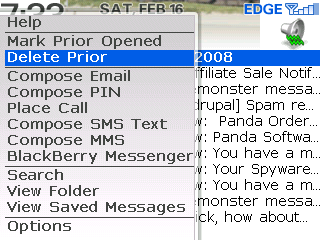
You can also select a prior day in your inbox, and only messages prior to and including that day will be deleted.
Be careful with this one though. It’s a very handy option that keeps your email inbox under control, but there’s no “Undo” feature, so deleting email messages is a permanent operation that happens immediately.
3. Move to the Top
When you get an email message and you open your Blackberry inbox, you’ll find yourself at the first unopened email message. That’s fine if you only have a few messages waiting to be read, but if you want to pop up to the top of the list to view the most recent message then here’s a handy shortcut.
Press the “T” key to move to the top of your email inbox, or press the “B” key to move back to the end.
With these shortcuts in mind, you can quickly move to the top of your inbox and mark all messages as read with just a couple button presses – putting you back in control of your Blackberry email.
What other tips and tricks have you found useful for Blackberry email?
i performed a reset on my
i performed a reset on my blackberry 9700 and all is working fine.
all my emails are downloading again on my headset but all in the email shortcut. i used to have a shortcut for each email account previously. how can i restore that? thanks!
same email address across multiple contacts
Hi –
I have multiple contacts that share the same email address (their company has a common account). Each of those contacts also have their own personal email address. At the moment when I receive an email from the common email from any of thos contacts my inbox is showing the name of only one. How do I set it up so that when receiving an email from the common account my inbox shows the company name (for example) and when receiving from the individual it shows his/her name. I want to be able to scroll through my inbox and identify what is comming from the common account and what is coming in from which individual without having to open the mail.
Pleased to hear!
Receive only the recent emails
Hi Guys,
How can i configure my BB (1 Storm and 1 Torch) to receive the last 10 emails only?
Thanks
BB 8530 email
Is there a way to select how often the 8530 checks email? Can I manually check for it like I could on my last palm phone? It uses a lot of battery to constantly be scanning for new mail.
Thanks, Eric
email
Is there a way to select how often the Torch 9800 checks email? Can I manually check for it like I could on my last palm phone? It uses a lot of battery to constantly be scanning for new mail.
Download Multiple Attachments
hi there, is there a way to download all attachments from one email to my phone? I have a BB 8520 curve.
Thank you!
HELP…
Any tip/hint for he following: my bb 9700 stopped receiving emails 3 weeks ago (aol) nothing i have done works so far… any idea as what i can do??
i read the tip previously
i read the tip previously about emails going to the sms inbox. I have a bb curve 8330 and I changed all the settings to seperate on the sms and email option but it asks if lines, stripes, or none. I have tried all of them but it still sends emails to my sms inbox. Its so annoying and I dont want to have to delete my email on the bb. thank you!
Curve 8530 Inbox
Hello,
We use text messages for work. When I receive a new message it does not automatically open. When I open my messages the prior message will typically open, not the new one. I have checked the box to open newest message when phone is removed from a holster and this has not changed anything. How can I get the newest text message to just open up on the screen when it is received. My phone is often on a work surface and not even in a holster.
Thank you,
Eric
Mark All Messages As Read/Opened on a Blackberry 8520
Mark All Messages As Read/Opened on a Blackberry 8520, on my phone there is no option for “Mark prior opened” should I just press “Mark Opened” thank you
email shows as read
hi,
Once i read the mails in blackberry 8520, and download to office mac (2008)entourage it shows as read.
due to heavy attachments some of the mails i have to open in the laptop too.
its diffult for me to find out the mails from that.
in the laptop if it shows all unread it will be good.
thanks, please help.
manoj
Good Day. I am new to
Good Day. I am new to blackberry and just purchased one a few months ago and so far I love it. I did have a question on how to do something. I noticed that when I go to the SMs and MMS and go to the compose email, I found that I have many miscellaneous names/addresses that come up. Now I have deleted them off my home computer but I am unsure how to remove them from showing on the blackberry? Would you be able to offer advice at your earliest convenience? Thank you for your time and help.
blackberry e-mail
I am wondering if it is possible to open my e-mail on my PC and have it be marked as read on my blackberry so that I don’t think it is a new e-mail on my phone?
I know how to do it the opposite way by when I open it on my phone and on my computer it appears read but I’m wondering about the reverse.
any response will be much appreciated. thanks.
help me please
This is driving me crazy.. When im talking on the phone and someone sends me a text message the ringtone goes on and plays the whole song and i cant hear who im talking to. How do i shut it off. I wanna keep my phone ringtone on audio and text messages but when im on the phone i want my text messages to either give a single beep letting me know i got a text or viberate. i cant seem to figure this out. PLEASE HELP!! i have a metro curve
Your phone shouldn’t ring
Your phone shouldn’t ring when this happens. If it does, change it to another ringer.
inbox messages
hi, i have a issue,
i have a bb torch and when i receive email in my inbox under email address i am unable to read it, i have to go back to message folder to read it. what can i do to get it back to my inbox.
let me know ASAP
Blackberry Question
Hi there,
I have Facebook on my phone, and I was just wondering if there was anyway I could delete posts off my wall easily. Example, If I had a status, how could I delete that? Please let me know.
Thank you so much.
– Marina
Save a copy of sent emails not set on BB – Can I get a copy
Hi
I have not set the “save a copy on send” option on the BB however I sent an email about 3months ago and want to see if it can in anyway be retrieved to allow me to have a copy of it… Its a personal BB (not a corporate one), so not stored on BES. It would have been sent from a POP account (something like Hotmail) that was setup
Sorry if this is a stupid question – I only ask as its an important mail and thought it worth asking
Thanks in advance
Paul
Hi.. I have a query.. I have
Hi.. I have a query.. I have set up a rule in gmail to have the mails from a particular sender to get forwarded to a folder. However, the mails are not showing up in my BB and that particular folder is empty. I dont receive his mails even in my inbox if not in the folder.
Any help/suggestions would be highly appreciated !
Hi, I can delete all my sms
Hi, I can delete all my sms messages but cant delete the messeges i recieve in my inbox from my facebook app? help me?
BlackBery Bold Email
I like to check my email on my Blackberry throughout the day and then in the evening go through my mail more thoroughly on my computer. Up until a couple of days ago, the mail I read on my Blackberry was still appearing as unread on my computer, which I liked. Now, if I open an email on my Blackberry, it appears as “read” on my computer. I don’t like this! How can I change it back?
Thanks for any help you can offer.
Deleted Mesage
Hi
I deleted and sms string in error and wondered whether there is a way on the black berry to recover the deleted sms string?
Regards,
Shaun
Control email reciept times
Hi
Can I stop recieveing emails from my work account at say 16H00 and then start recieving at say 08H00 monday to friday and not receive email from this account on weekends. but recieve emails from my personal account 24/7.
regards,
not as good as iphone
I sure am glad you pointed that out to me. I played around with my email forever and could not figure out an easy way to get rid of the stupid number at the top of the home screen without manually opening and closing all my unread emails. So that mark all prior as open button is awesome. I still wish they’d set it up like the iphone to where you can hit an edit button, check mark all the ones you want to delete, then delete them all at once by pushing delete. With the blackberry you either delete them all or manually delete one at a time. It’s just not as efficient. I like my blackberry but not because of the email feature.
I have an email account
I have an email account activated on my former blackberry bold,nw I have another blackberry with me activated the email again..hw can I delete the account on the former blaclberry bold pls
table reader in email
i am not able to read tables received in the mail seen on body text of the mail. how do i read contents as the table get scattered on the screen. is there any app or any kind of seeting….m using a curve 8520
email sync
Hi there
Since the blackberry crash recently, my emails don’t come to my handheld. This is a real pain and I don’t know how to fix it. My email settings all seem to be in order, and blackberry help is no help at all. I’m hoping you’ll be able to give me the magic spell!! Please 🙂
Email Reconciliation
When I view the mail in my BB device the same is shown as read mail on my laptop, I need to know how to keep mails read through BB device but still shown as unread on my laptop
why am i not receiving all
why am i not receiving all my emails on blackberry 8520?
Hi, I have an issue with my
Hi, I have an issue with my Blackberry Touch whereby after opening an e-mail message, the message automatically deletes. I haven’t found what setting that is so I can change it back — as of a couple weeks ago it was not deleting them automatically.
Thanks!